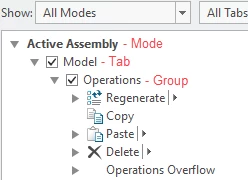
Need a config option to turn off auto propagation to all modes in the ribbon
I was trying to add some new mapkeys to our custom tab in the ribbon in Creo 4-m090 and I discovered, much to my consternation that it's propagating those options to all modes of the ribbon. GRRRRRR!!!!
I've finally saw the help doc and David Martin's video on this subject. I suppose some would think this is an enhancement. I don't, it's an irritation, and it wasn't obvious how to change it without referring to additional documentation. A radio button in the UI to propagate or not propagate would have been helpful instead of hiding it under a right click.
My mapkeys are mode dependent. I don't want to add mapkeys to the ribbon in a mode where it will fail. Right clicking on each thing I add to limit it to a specific mode seems like a lot of extra work.
I'm hoping there is a hidden config that will restore the behavior to the old method where you have to be in the mode to add things to that mode. Is there such an option?
I didn't see one in the standard options.
Also editing my current ribbon appears to mess up the current uniqueness for each mode. I don't see a way to universally change the behavior anywhere in the UI.