1-Visitor
November 11, 2015
Solved

Need help using the pattern command.

  • November 11, 2015
  • 1 reply
  • 3172 views

I have abandoned trying it on my part, and have just extruded  a cube, and put a hole in it. I want to pattern the hole. I'm getting errors such as No valid owner found for the reference object. I have tried to follow the help file, but after hours of attempts, I've given up trying.

I can't select the hole. All I get is the above error message, along with another that I can't reproduce at the moment.

Can anyone point me to a source that helps out with explaining this?

Thanks, Gregg


This thread is inactive and closed by the PTC Community Management Team. If you would like to provide a reply and re-open this thread, please notify the moderator and reference the thread. You may also use "Start a topic" button to ask a new question. Please be sure to include what version of the PTC product you are using so another community member knowledgeable about your version may be able to assist.
Best answer by FriedhelmK

Probably the problem is that the hole is not yet a valable feature for the program.

Look at the following pictures.

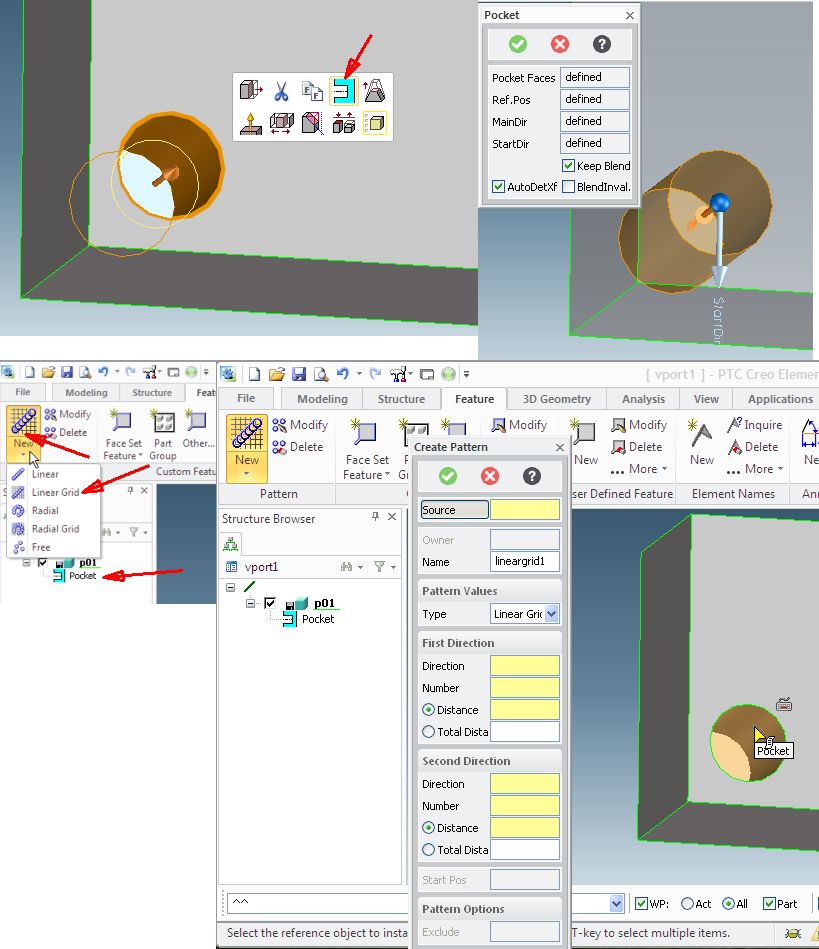
Select the (2) faces of the hole and confirm the selection.

Klick on the blue icon and confirm the dialog.

Now you have a feature. See "Poket" below p01.

If the hole goes trought the part the name will be "Breakthrough" and you will get an other symbol.

Now go to Feature and make choice between the different pattern.

I will show Linerar Grid.

Select the Poket and go on to fill the yellow menue fields.

Pattern1.jpg

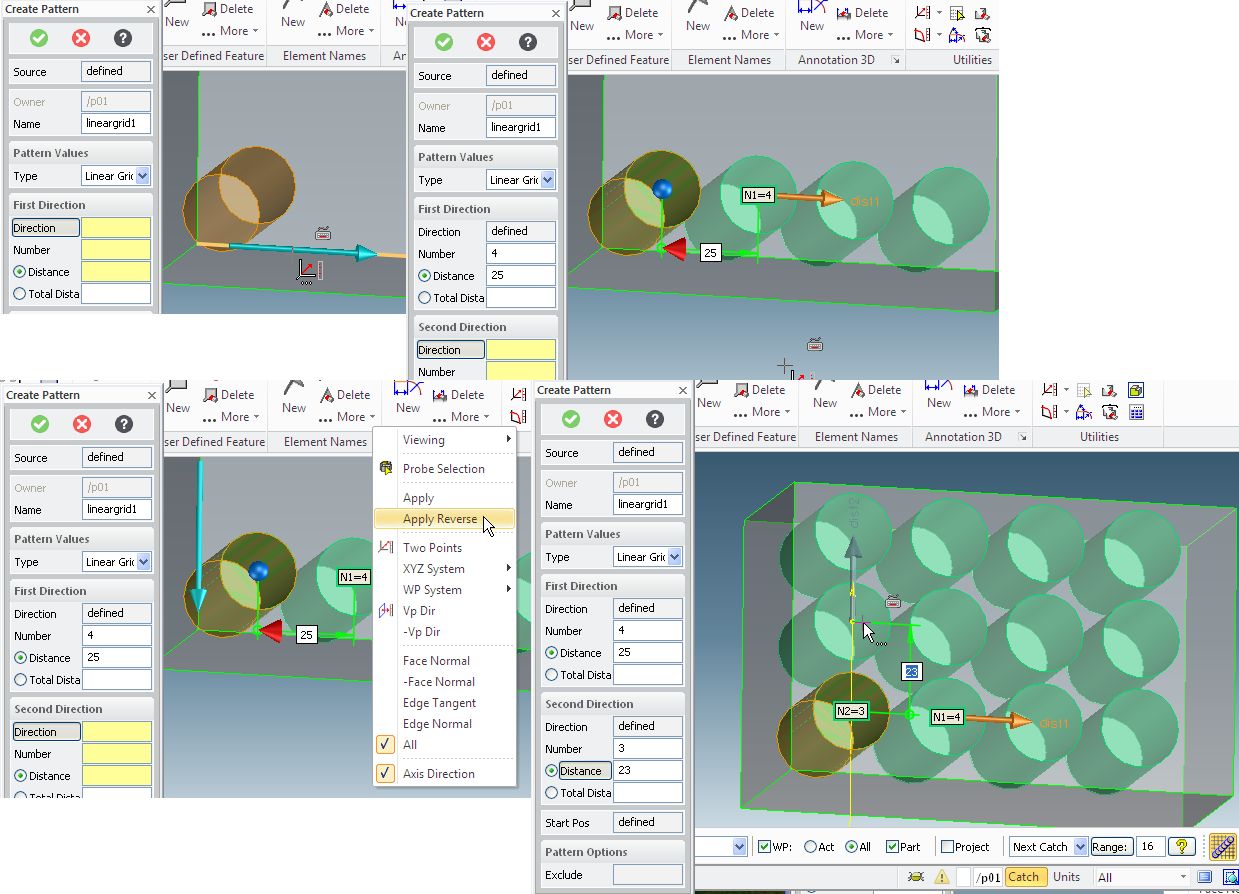
i think the following picture is selfs explaining.

If the arrow for the selection of the direction will not point in the good direction, right klick in empty place and klick on

Apply reverse.

Pattern2.jpg

And confirm.

Good luck and have pleasure with this Programm

1 reply

24-Ruby III
November 12, 2015

Gregg,

I found following video on Youtube, maybe it helps you .

3D CAD: Creo Elements/Direct 17 - Advanced Patterns - YouTube

MH

gkuljian1-VisitorAuthor
1-Visitor
November 12, 2015

The problem is where he selects the feature, I get an error message. Yes, I already watched that video. I have wasted more time  with this creo than it's worth. Terrible documentation.

What is going on that I can't select a feature? That's the question I'm trying to figure out.

By the way, 2d pattern does work. But that won't help me pattern the holes in 3d.

17-Peridot
November 12, 2015

Probably the problem is that the hole is not yet a valable feature for the program.

Look at the following pictures.

Select the (2) faces of the hole and confirm the selection.

Klick on the blue icon and confirm the dialog.

Now you have a feature. See "Poket" below p01.

If the hole goes trought the part the name will be "Breakthrough" and you will get an other symbol.

Now go to Feature and make choice between the different pattern.

I will show Linerar Grid.

Select the Poket and go on to fill the yellow menue fields.

Pattern1.jpg

i think the following picture is selfs explaining.

If the arrow for the selection of the direction will not point in the good direction, right klick in empty place and klick on

Apply reverse.

Pattern2.jpg

And confirm.

Good luck and have pleasure with this Programm