16-Pearl
September 12, 2024
Solved

New Creo Models are listed as "Released"

  • September 12, 2024
  • 4 replies
  • 2047 views

Hi there,


I have an odd "thing" in Creo and/or Windchill.

When I create a new Object (like a Assembly) and I edit its parameters, the lifecycle state is set to "Released":
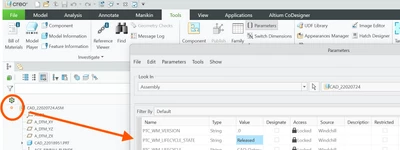
 

Mat_1-1726125380555.png

only if I upload the file, the correct state is displayed:
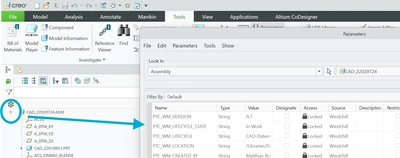
Mat_2-1726125530571.png


@unknown: Is this behavior intended or is this a bug?


I am using Creo 10.0.5.0 with Windchill 12.0.2.19


Best answer by Mat

OK, it seems, that this behavior only appears, if You create a subassembly within an assembly.

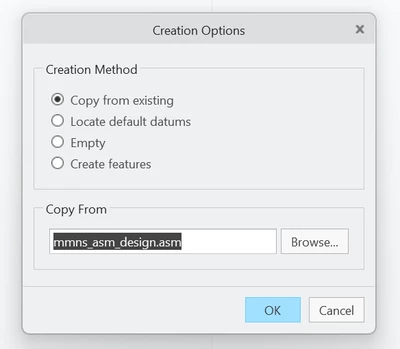
So my educated guess is, that Creo copies the state from the existing template at this step:


Mat_0-1726496515446.png

Right after its creation, the new sub assembly even shows the Version "D.2", which is the template's Version

Mat_1-1726496730181.png

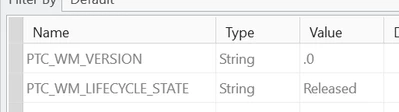
But as soon as I save the new sub assembly, its version gets changed to ".0"

Mat_2-1726496819364.png


I consider this as a Bug in Creo, since not all attributes are set to a "default" value on creation and/or first save.

The "solution" is to wait the next decade until PTC fixes this problem.


4 replies

Catalina
Community Moderator
September 16, 2024

Hi @Mat,

Thank you for your question!

Your post appears well documented but has not yet received any response. I am replying to raise awareness. Hopefully, another community member will be able to help.

Also, feel free to add any additional information you think might be relevant.


Thanks for using the Community!


Best regards,

Catalina | PTC Community Moderator
24-Ruby III
September 16, 2024

Hi,

please ask PTC Support.

23-Emerald III
September 16, 2024

Check your OIR for new EPMDocuments.

Mat16-PearlAuthorAnswer
16-Pearl
September 16, 2024

OK, it seems, that this behavior only appears, if You create a subassembly within an assembly.

So my educated guess is, that Creo copies the state from the existing template at this step:


Mat_0-1726496515446.png

Right after its creation, the new sub assembly even shows the Version "D.2", which is the template's Version

Mat_1-1726496730181.png

But as soon as I save the new sub assembly, its version gets changed to ".0"

Mat_2-1726496819364.png


I consider this as a Bug in Creo, since not all attributes are set to a "default" value on creation and/or first save.

The "solution" is to wait the next decade until PTC fixes this problem.