1-Visitor
December 20, 2016
Solved

Part library Installation

  • December 20, 2016
  • 2 replies
  • 3047 views

Hi,


I have installed the part library module (following standard installation prompts and directories) - but when I try launch it, I get the following error:
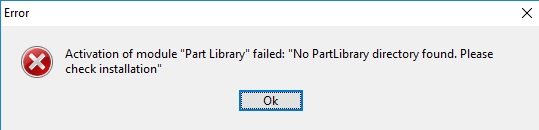
 

Error.jpg

Any assistance would be greatly appreciated.


Thank you.

Best answer by MaxR.Kublin

Is Modeling also V19?

If yes, you have possibly NOT installed part library but 3D Library or 2D library?

2 replies

1-Visitor
January 2, 2017

Can you please check if you have a valid registry entry for PartLibVersion under HKEY_LOCAL_MACHINE\SOFTWARE\Wow6432Node\CoCreate\PartLibrary\20.0 and the variable PartLibPath under HKEY_LOCAL_MACHINE\SOFTWARE\Wow6432Node\CoCreate\PartLibrary\20.0.0000 shows correct part of installed Part Library?

If you have installed 19.0 PL, please change 20.0 with 19.0 in above registry entries.

HTH,

Ashish Khare

13-Aquamarine
March 31, 2017

Version of Part Library must match the version of Modeling.
Which version are you using?

msanan1-VisitorAuthor
1-Visitor
March 31, 2017

Hi Max.

I'm using V19 as supplied via install media from PTC.

Thanks

13-Aquamarine
March 31, 2017

Is Modeling also V19?

If yes, you have possibly NOT installed part library but 3D Library or 2D library?