Solved
please check Mapkey log
I am using Creo Parametric Release 10.0 and Datecode10.0.0.0
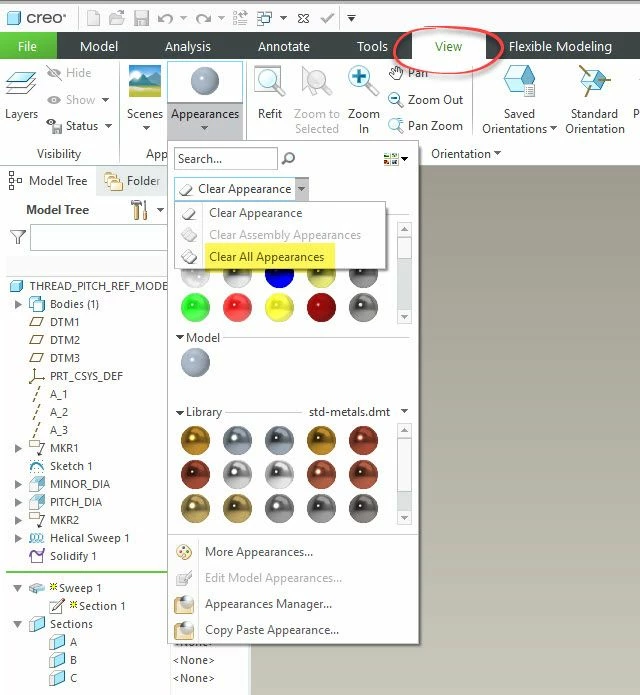
Hello, I just made below mapkey yesterday. And I want modify it, I want add something between them.....sadly I can't remember how I did it...
can you explain them ??
mapkey ac @MAPKEY_LABELauto color;\
mapkey(continued) ~ Select `main_dlg_cur` `View:ProCmdViewGallery`;\
mapkey(continued) ~ Select `main_dlg_cur` \
mapkey(continued) `ProCmdViewGallery_layoutph.palette_holder.clearAppearance`;\
mapkey(continued) ~ Close `main_dlg_cur` \
mapkey(continued) `ProCmdViewGallery_layoutph.palette_holder.clearAppearance`;\
mapkey(continued) ~ Activate `main_dlg_cur` `clearAllAppearance`;\
mapkey(continued) ~ Activate `UI Message Dialog` `yes`;
Hello, I just made below mapkey yesterday. And I want modify it, I want add something between them.....sadly I can't remember how I did it...
can you explain them ??
mapkey ac @MAPKEY_LABELauto color;\
mapkey(continued) ~ Select `main_dlg_cur` `View:ProCmdViewGallery`;\
mapkey(continued) ~ Select `main_dlg_cur` \
mapkey(continued) `ProCmdViewGallery_layoutph.palette_holder.clearAppearance`;\
mapkey(continued) ~ Close `main_dlg_cur` \
mapkey(continued) `ProCmdViewGallery_layoutph.palette_holder.clearAppearance`;\
mapkey(continued) ~ Activate `main_dlg_cur` `clearAllAppearance`;\
mapkey(continued) ~ Activate `UI Message Dialog` `yes`;