
14-Alexandrite
June 2, 2020
Solved

Port Conflict Warning Message - How to Remove?

  • June 2, 2020
  • 2 replies
  • 6445 views

Community,


Please read the below snippet.  No how many times I restart Creo 6, I always get this port conflict warning.  Is there a way to resolve this?  This happened during a PTC technical support call where I requested that I do not want to use LMTools to create services.  I am using a locked license for Creo Parametric, and flex admin for Creo Simulate.  Also, it takes an extremely long time to start Creo.  Thanks in advance.
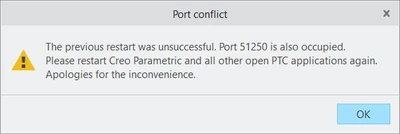
 

port_conflict.png

Best answer by ThoRig

I resolved this by installing a newer version of creo.

2 replies

Mahesh_Sharma
22-Sapphire I
June 2, 2020

@ThoRig


Try the options listed in below article, it may help. 

https://www.ptc.com/en/support/article/CS69409

ThoRig14-AlexandriteAuthor
14-Alexandrite
June 2, 2020

Thanks.  I will look into it.

ThoRig14-AlexandriteAuthorAnswer
14-Alexandrite
July 12, 2020

I resolved this by installing a newer version of creo.