

1-Visitor
July 4, 2025
Solved

Preview Model button lost from File Open window

  • July 4, 2025
  • 2 replies
  • 477 views

I am using Creo Parametric Release 11.0 and Datecode11.0.3.0

The Preview File button has disappeared from the File Open window. I use this feature all the time. Please advise how to restore the function. I have searched the config options but no luck. Thanks.

Best answer by Mahesh_Sharma

Hello @ptc-1920637 


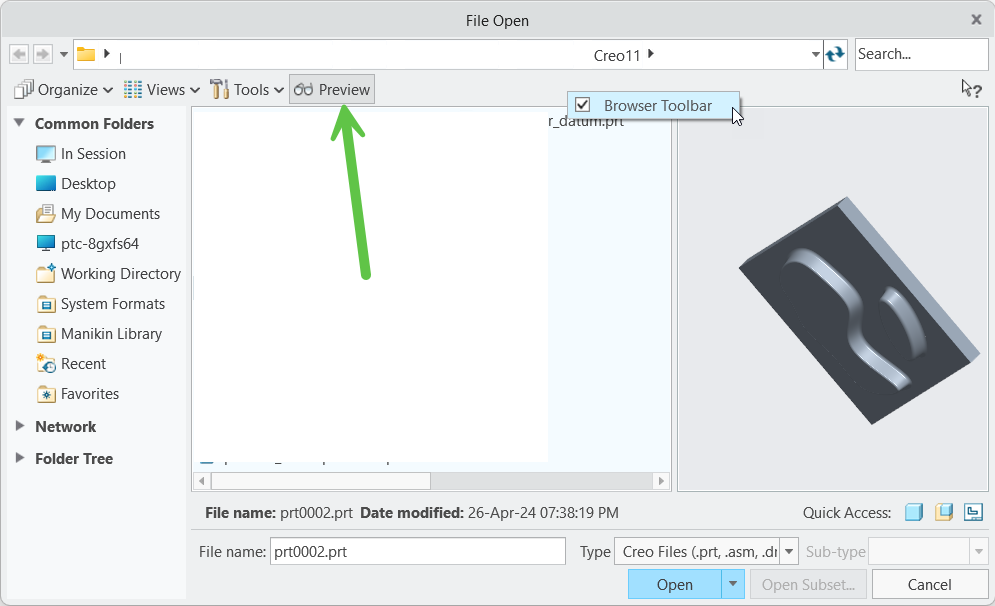
You may need to enable toolbar in File > Open dialog box. 

As shown in image RMB > Browse Toolbar to enable Preview. 


https://www.ptc.com/en/support/article/CS410314 


I hope this will help.


Thanks. 

2 replies

tbraxton
22-Sapphire II
22-Sapphire II
July 4, 2025

Are you sure the files were saved in a manner to support the preview functionality? Is preview functionality not working on all files or just on some?


Previewing is available for files saved in a version of Creo Parametric that supports previewing.
Objects appear in the Preview window as they were saved. For example, if the layer for datum curves was blanked when the file was saved, that layer is blanked in the preview.
22-Sapphire I
July 4, 2025

Hello @ptc-1920637 


You may need to enable toolbar in File > Open dialog box. 

As shown in image RMB > Browse Toolbar to enable Preview. 


https://www.ptc.com/en/support/article/CS410314 


I hope this will help.


Thanks.