

5-Regular Member
November 4, 2025
Question

Pro_Library_dir not showing on Creo Browser

  • November 4, 2025
  • 2 replies
  • 608 views

A user recently got a new computer with Creo 11.0.3.0. They noticed that their "shortcut" to Pro/Library was missing on left hand side of the Creo Browser underneath Common Folders. 

We looked into their config.pro and saw no issues. The pro_library_dir was even defined as it is on all other users' computers also running Creo 11.0.3.0. I even changed the setting on the config.sup file on their computer and that failed to make the Pro/Library shortcut show up. 

Has anyone else ran across this issue and what steps would you take to make the shortcut show up?

Below is a picture of how it shows on my Creo Browser. 
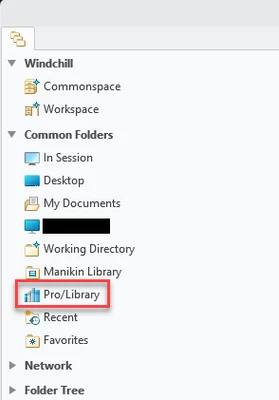
AL_10705173_0-1762281033023.png


2 replies

15-Moonstone
November 5, 2025

The value of pro_library_dir depends on the system locale (Windows interface language).
For English, you will have, for example:
pro_library_dir wtpub://wt-server/Libraries
For another language, you must change the word "Libraries" in the option value

15-Moonstone
November 5, 2025

I would suggest checking what the user has as the EXACT "NAME" of the Windchill server. The NAME is in the path for the library in your system config.pro so if they are not using the correct NAME then the library location won't be found correctly. Everything else not covered by a config.pro path will work fine.

5-Regular Member
November 5, 2025

This is the folder path: wtpub://wcplus/Products/Library/

The path is the same for my config.pro and the other user's config.pro. We are knocking our heads against the wall of what the issue can be when we have all the same settings and config.pro files.

16-Pearl
November 5, 2025

As  rreifsnyder suggested, have you checked that the user registered the Windchill server with the exact servername?  In your case, it looks like "wcplus".  The name is case sensitive.