
1-Visitor
December 14, 2020
Question

Problem with open onedrive files

  • December 14, 2020
  • 2 replies
  • 10897 views

Dear all,

I meet with a terrible problem with opening files in Creo Parametric. When I create a part or assembly on one computer and synchronized it to another computer with Onedrive. The file of the part couldn't be seen in Creo open file window. If I copy these files to another address in the system. The files will appear in Creo. However, this is not applicable to deal with many files. 

I'd like to ask if there's any solution to this problem.
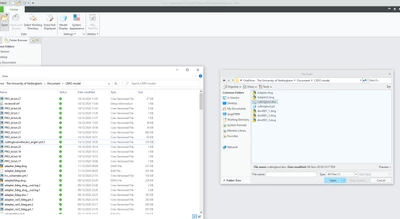
Screenshot 2020-12-14 121343.png

Thanks for your time.

Kind Regards

SZ

2 replies

24-Ruby III
December 15, 2020

@SZ_9707602 wrote:

Dear all,

I meet with a terrible problem with opening files in Creo Parametric. When I create a part or assembly on one computer and synchronized it to another computer with Onedrive. The file of the part couldn't be seen in Creo open file window. If I copy these files to another address in the system. The files will appear in Creo. However, this is not applicable to deal with many files. 

I'd like to ask if there's any solution to this problem.

Screenshot 2020-12-14 121343.png

Thanks for your time.

Kind Regards

SZ


Hi,

I'm afraid that the ability to store data in OneDrive is not implemented in PTC products.

In https://www.ptc.com/en/support/article/CS36355 PTC did not answer OneDrive usability question.

23-Emerald III
December 15, 2020

PTC's solution would be to use Windchill/PDMLink for data management of your design files.