

14-Alexandrite
July 31, 2018
Solved

Problem with update FlexLM 10.8 to FlexNet 11.14

  • July 31, 2018
  • 2 replies
  • 7894 views

Zdarex,

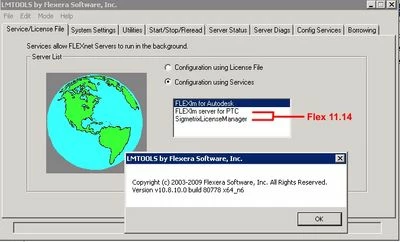
I run 3 services on former FlexLM 10.8 but now need to keep Autodesk only. Want to remove remaining 2 and migrate them under latest FlexNet 11 as described:
00.jpg


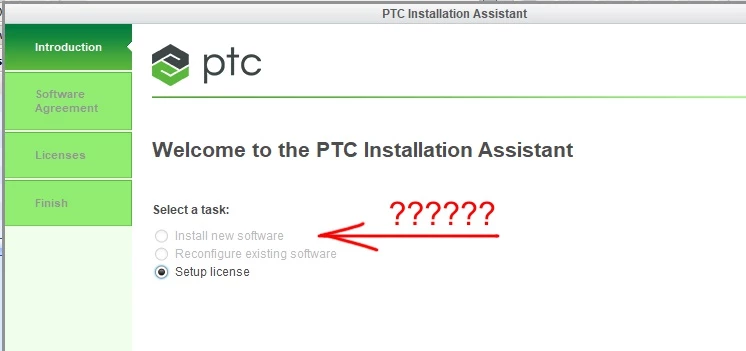
Because of Creo 4 need to install FlexNet 11 but unable to run proper installation. I have downloaded standalone Flex 11 installation files from PTC but everytime starting process (as admin of course) have available "Setup license" only. What I need is "Install new software" option. My idea is to remove 2 services from 10.8 and run them under 11.14 but cannot go through even FlexNet installation to get new service...
 

01.jpg


Any ideas what is wrong? Thx

Best answer by MartinHanak

Hi,


FlexNet 11.14 has two variants:

  • lmadmin based (installed by default)
  • lmgrd based

You can download installation packages from

https://support.ptc.com/WCMS/files/121640/en/PTC_LMS_Download.pdf

 document.


Option no.1:

  • download flex11.14.1.2_x86e_win64.zip
  • unzip flex11.14.1.2_x86e_win64.zip
  • stop FLEXlm server for PTC service using services.msc
  • rename original files in FLEXnet 10.8 installation
  • copy unzipped 11.14 files
  • start FLEXlm server for PTC service using services.msc

Option no.2:

  • stop FLEXlm server for PTC service using services.msc
  • uninstall FLEXnet 10.8
  • install FLEXnet 11.14 using flexnetadmin64_11.14.1.2.zip


2 replies

24-Ruby III
July 31, 2018

Hi,


FlexNet 11.14 has two variants:

  • lmadmin based (installed by default)
  • lmgrd based

You can download installation packages from

https://support.ptc.com/WCMS/files/121640/en/PTC_LMS_Download.pdf

 document.


Option no.1:

  • download flex11.14.1.2_x86e_win64.zip
  • unzip flex11.14.1.2_x86e_win64.zip
  • stop FLEXlm server for PTC service using services.msc
  • rename original files in FLEXnet 10.8 installation
  • copy unzipped 11.14 files
  • start FLEXlm server for PTC service using services.msc

Option no.2:

  • stop FLEXlm server for PTC service using services.msc
  • uninstall FLEXnet 10.8
  • install FLEXnet 11.14 using flexnetadmin64_11.14.1.2.zip


PetrP14-AlexandriteAuthor
14-Alexandrite
August 1, 2018

Zdar,

tried "full admin installer" but again see available option "Setup license" only as before (no matter on which PC/server trying to install it, everywhere is "Install new software" greyed out). I had the same install files before so no progress at all.

Gonna try replacing those 4 files only. Believe should work...

Zatím dík

24-Ruby III
August 1, 2018

Hi,

when you report some problem next time, please attach also pictures and detail description of all installation steps.

16-Pearl
August 1, 2018

Actually, nothing is wrong. "Install new software" in the installer pertains to installing new Creo software and not license server. (Installing license server is optional step during configuring licenses).

"Setup license" is an option to install license server only, without any Creo application. When you select "Setup license" and go to next screens, you'll be able to browse to your license file and installer will automatically install Flexnet server. There is no explicit option named "Install license server" or something like that, Flexnet is installed as a part of license setup.

PetrP14-AlexandriteAuthor
14-Alexandrite
August 1, 2018

Tried option no. 1 like Martin suggested. Looks working OK! Nice and easy.


00.jpg