1-Visitor
April 21, 2015
Question

PTC Creo Agent error

  • April 21, 2015
  • 8 replies
  • 6458 views

Has anyone seen this error message after a CREO 3.0 M020 install?

Should I remove and reinstall CREO M020?
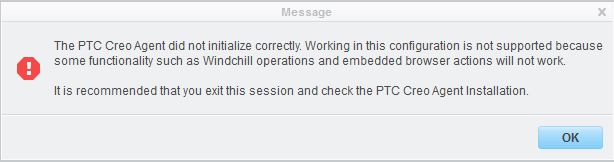
Capture.JPG


Thanks for the help!

8 replies

23-Emerald IV
April 21, 2015

Our users get this all the time, most frequently the first time they startup in the morning. Simply close and re-launch Creo. No reinstallation required.

jclaus1-VisitorAuthor
1-Visitor
April 21, 2015

Thanks for the reply Tom.

But, I see this error pop-up within minutes after every Creo launch.

23-Emerald IV
April 21, 2015

If you re-run the installer (without uninstalling first) is it listed as installed?

1-Visitor
April 22, 2015

I had the same thing happen when I installed Creo 3.0 M020 and M030 and the way I got around this after multiple installs was when I ran the setup.exe, I had to right mouse button and "run as administrator". Once I did the installation in this manner, that message had not been seen since.

Hope this helps,

Shane V.

1-Visitor
September 1, 2015

I have same problem with Creo 3 on my computer with Windows XP Professional SP2. I see the topicstater' dialog, therefore built-in browser didnt work. And when I start creoagent.exe manually I see next pic. What can I do with this? May I use other version of agent to work in WinXP?

creoagent.PNG

24-Ruby III
September 2, 2015

Aleksandr,

Windows XP and Windows Server 2008 support is discontinued for Creo 3.0.

Martin Hanak
