


Ratio Dims and 1 Decimal Place Rounding
Creo 2, M220
Our client's default units are mm and their config file has default_dec_places set to 1.
With normal dimensions, within the feature creation the value rounds to a single decimal place, but if you edit the feature (not edit definition) you can type in a 2 or more decimal number and Creo retains the value, but displays it as one decimal place.
I'm having issues, however, with ratio dims, in particular the dims that place the radius points in a variable round:
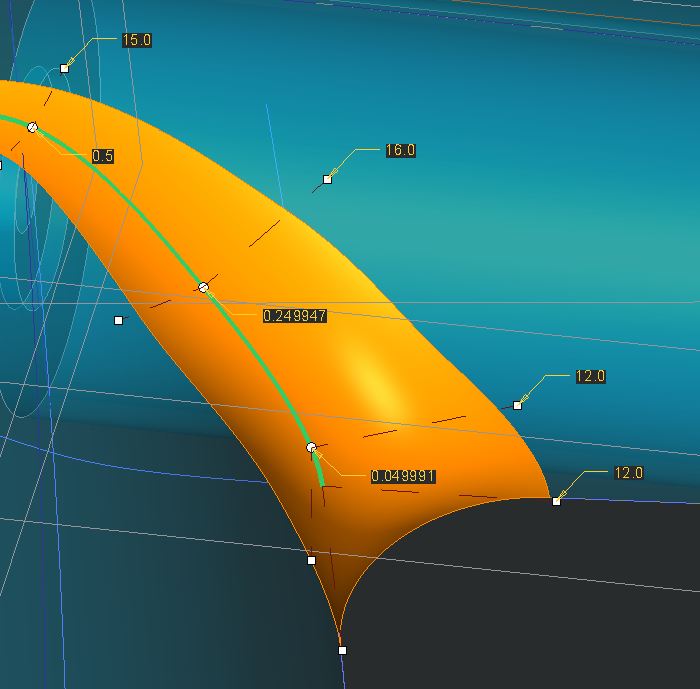
I can drag those points and Creo gives me the 6 digit, somewhat random numbers above. Creo seems to snap in roughly 0.05 increments, however if I enter 0.05 Creo converts it to 0.1, 0.25 becomes 0.3, etc. I cannot enter in dims in smaller increments than 0.1 and I cannot drag in increments smaller than roughly 0.05.
In this case I need the fine control to put those points where I want. Is there a way to set Creo to ignore the default_dec_places setting for ratio dims?
This thread is inactive and closed by the PTC Community Management Team. If you would like to provide a reply and re-open this thread, please notify the moderator and reference the thread. You may also use "Start a topic" button to ask a new question. Please be sure to include what version of the PTC product you are using so another community member knowledgeable about your version may be able to assist.