

16-Pearl
September 22, 2021
Solved

Re: Creo Parametric 4.0 embedded chromium_browser display issue with Windows 10 scale larger than 10

  • September 22, 2021
  • 4 replies
  • 5806 views

As per this thread - same problem


Yes, I can confirm that this issue is present again in 8.0.1.0

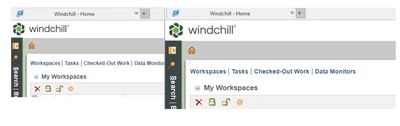
Oddly, the scaling seams only to appear, when a browser window is pop-out (e.g. you click a link, that opens a new window with Windchill).

But this instantly scales also the content of the docked window.
Mat_0-1632310141062.png

(before and after)

I tried the solution/workaround described by llie, but unfortunately this did not solve the problem.
Best answer by RandyJones

@Mat wrote:

As per this thread - same problem


Yes, I can confirm that this issue is present again in 8.0.1.0

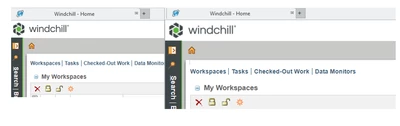
Oddly, the scaling seams only to appear, when a browser window is pop-out (e.g. you click a link, that opens a new window with Windchill).

But this instantly scales also the content of the docked window.

Mat_0-1632310141062.png

(before and after)

I tried the solution/workaround described by llie, but unfortunately this did not solve the problem.


I can confirm the same issue with 8.0.1.0. I have also just downloaded 8.0.2.0 and the issue seems to be fixed.

PTC has updated the embedded browser version:

  • Creo Parametric 8.0.0.0 and 8.0.1.0
    • chromium version 85.0.4183.121
  • Creo Parametric 8.0.2.0
    • chromium version 91.0.4472.124

Which you can get by doing a chrome://version in the url bar of the embedded browser or see the ptc article CS187581

https://www.ptc.com/en/support/article/CS187581

4 replies

Mat16-PearlAuthor
16-Pearl
October 13, 2021

so, some weeks later. 

Does ptc have the intention to address this issue?

Is there a other solution than "crossing fingers and hoping for 8.0.2.0"?

24-Ruby III
October 13, 2021

Have you previously reported this to the technical support? "Case Logger": https://www.ptc.com/en/support/case-logger

Mat16-PearlAuthor
16-Pearl
October 13, 2021

Sorry, but I have no access to that (Support via support provider).

20-Turquoise
October 15, 2021

@Mat wrote:

As per this thread - same problem


Yes, I can confirm that this issue is present again in 8.0.1.0

Oddly, the scaling seams only to appear, when a browser window is pop-out (e.g. you click a link, that opens a new window with Windchill).

But this instantly scales also the content of the docked window.

Mat_0-1632310141062.png

(before and after)

I tried the solution/workaround described by llie, but unfortunately this did not solve the problem.


I can confirm the same issue with 8.0.1.0. I have also just downloaded 8.0.2.0 and the issue seems to be fixed.

PTC has updated the embedded browser version:

  • Creo Parametric 8.0.0.0 and 8.0.1.0
    • chromium version 85.0.4183.121
  • Creo Parametric 8.0.2.0
    • chromium version 91.0.4472.124

Which you can get by doing a chrome://version in the url bar of the embedded browser or see the ptc article CS187581

https://www.ptc.com/en/support/article/CS187581

18-Opal
January 22, 2022

@RandyJones,

Last year we had zooming issue but ended up just switching back to IE.  However, I think during last testing I played around with the Win10 compatibility options on the Windows Properties of the file/shortcut and it may have had some positive effect...


Now we are looking at Chromium again but don't yet have a system that I can reproduce it on for testing purposes. 

12-Amethyst
January 11, 2024

Also have this reoccurring in Creo 9.0.4 only on one bit of hardware.


Setting the OS scaling to 100% instead of 125% resolves it, but the browser_os_scale key introduced for Creo 7 has been removed in later version, despite it fixing the problem.

18-Opal
January 11, 2024

I don't see browser_os_scale as an option in Creo, nor do I seem to get results when I google it. I also searched in various ways using the options search in Creo (I looked in Creo 7.0.11.0).  Are you sure the option doesn't have another name?

12-Amethyst
January 12, 2024

I don't remember the exact name of the option, but it's documented in CS358790.

Unfortunately when I queried if the option was available beyond Creo 7, PTC made the article customer-invisible- as they have retired it in later versions after deeming the issue resolved.


Certainly exists and worked in Creo 7.0.10, but no longer recognized by Creo 9.

Certainly the config itself was undocumented and not available in the config search/finder, but would indeed still work.