

1-Visitor
April 29, 2015
Question

Results coordinate system, is there a default off?

  • April 29, 2015
  • 1 reply
  • 1884 views

Since Creo, we have this ugly coordinate system that appears in every result window, in the origin of the model.
I know how to switch it off, but have to do that for each and every result window again. it's still there in Creo 3.0, but I have not yet found a config option to set the default to off. Who knows how to do that?
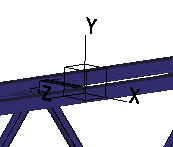
coorsys.PNG

Thanks in advance

Erik

1 reply

1-Visitor
November 27, 2017

Has this question ever been addressed? I would like to have the default OFF for the cys.

12-Amethyst
November 30, 2017

You'll need to add the configuration option "display_coord_sys no" to the correct config.pro file.


Config.pro files are stored in different locations depending on how your company has Creo setup.  But you'll probably be safe if you add it to the "start in" folder that is defined in the properties of the icon that starts Creo.

1-Visitor
December 1, 2017

This is the analysis results coordinate system within Mechanica, not datum feature coordinate system within Creo.


Maybe the config option works in both places, but I doubt it (aka don't believe it.)