
10-Marble
November 26, 2014
Solved

saving a copy of an asm and auto file nameing

  • November 26, 2014
  • 1 reply
  • 2463 views

Does any one know if it is possible to asave a copy of a file and have all internal parts file name generate automatically?

for example, when we save a copy of a step file the parent file name 230000

each a child, prt or asm, would have a naming convention as follows

230000-101

230000-102

etc.

thanks Mike


This thread is inactive and closed by the PTC Community Management Team. If you would like to provide a reply and re-open this thread, please notify the moderator and reference the thread. You may also use "Start a topic" button to ask a new question. Please be sure to include what version of the PTC product you are using so another community member knowledgeable about your version may be able to assist.
Best answer by David_M

Capture.PNG

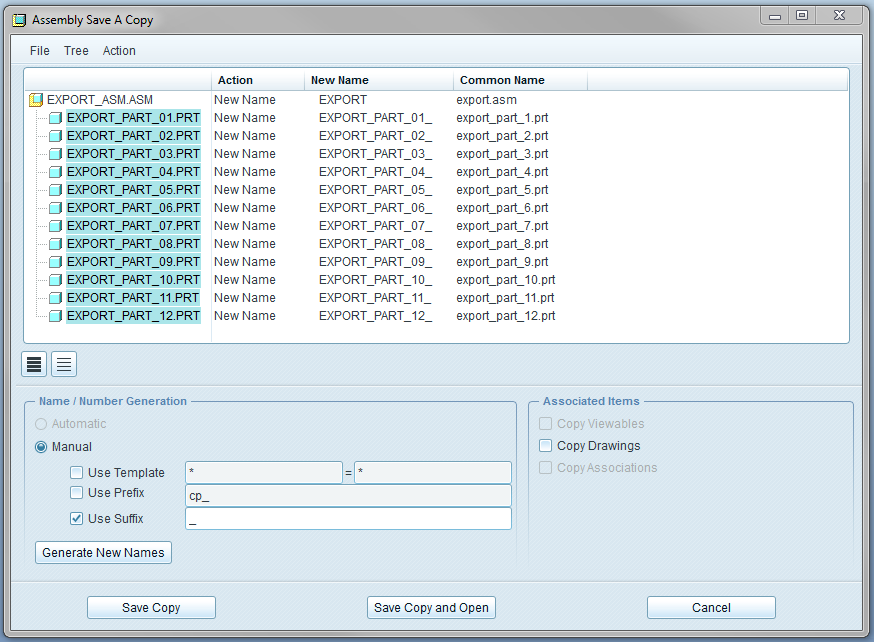
After following the above instructions, highlight all the parts (not the top level) and right click > new name. Hit "Generate New Names". File > Save. Open the saved file in a text editor to familiarize yourself with the format. Now open in Excel or continue editing in plain text. Specify new names. Save with the same structure.

Return to this dialogue box. File > Load. Hit "Save a Copy".

This tool is poorly documented. You may be able to get something more streamlined to work using FEAT# or an incrementing variable to assign numbers.

1 reply

1-Visitor
November 26, 2014

If you add this line to your config.pro file, you can access the tool which allows you to specify how your assembly is re-named:

model_rename_template yes

Now the tool will appear when you run File > Save a Copy (and type a name for the top level assembly and hit enter).

However, getting this tool to do anything correctly is a task in itself.

10-Marble
November 26, 2014

yes,

it is the children that i am struggling with. I just saved a copy of a step file I recieved from a vendor that 200 children. Takes about 15-20 minutes to rename all the children.

Any thoughts?

Mike

David_M1-VisitorAnswer
1-Visitor
November 27, 2014

Capture.PNG

After following the above instructions, highlight all the parts (not the top level) and right click > new name. Hit "Generate New Names". File > Save. Open the saved file in a text editor to familiarize yourself with the format. Now open in Excel or continue editing in plain text. Specify new names. Save with the same structure.

Return to this dialogue box. File > Load. Hit "Save a Copy".

This tool is poorly documented. You may be able to get something more streamlined to work using FEAT# or an incrementing variable to assign numbers.