
1-Visitor
July 23, 2012
Solved

saving exploded positions

  • July 23, 2012
  • 1 reply
  • 13013 views

after i edit positions of an exploded view, I save the asm. How do i save the exploded view positions so next time I open the asm it will explode the same. I'm sure this is easy I just dont know how to do it. any help would be great. Thanks people.


This thread is inactive and closed by the PTC Community Management Team. If you would like to provide a reply and re-open this thread, please notify the moderator and reference the thread. You may also use "Start a topic" button to ask a new question. Please be sure to include what version of the PTC product you are using so another community member knowledgeable about your version may be able to assist.
Best answer by BrianMartin

Hi Daryl...

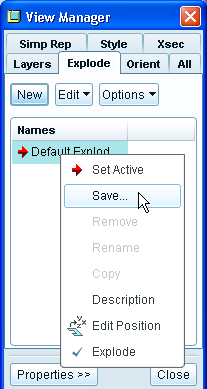
I've found this to be a bit wonky, too. I used to be that just exploding and saving was enough. Now, if you go under the View Manager and get to the Explode tab, you can right-click in the listing of available explode states and select Save from the menu (as shown below). This will ensure your current explode state is explicitly saved. You still need to save the file... but now your exploded components will go back to the correct locations the next time you open the model.

explode.png

I hope this helps. Let me know if this works for you or if the problem still persists. One issue is that I'm not sure which version of Creo or Wildfire you're running. I took this screen capture on Creo Elements Pro/5 (Wildfire 5).

Thanks!

-Brian

1 reply

13-Aquamarine
July 23, 2012

Hi Daryl...

I've found this to be a bit wonky, too. I used to be that just exploding and saving was enough. Now, if you go under the View Manager and get to the Explode tab, you can right-click in the listing of available explode states and select Save from the menu (as shown below). This will ensure your current explode state is explicitly saved. You still need to save the file... but now your exploded components will go back to the correct locations the next time you open the model.

explode.png

I hope this helps. Let me know if this works for you or if the problem still persists. One issue is that I'm not sure which version of Creo or Wildfire you're running. I took this screen capture on Creo Elements Pro/5 (Wildfire 5).

Thanks!

-Brian

DarylWolf1-VisitorAuthor
1-Visitor
July 24, 2012

Thats what i needed. Thanks Brian.

17-Peridot
July 25, 2012

That one got me too. Pretty silly that the save function isn't linked back to the explode dialog.