
13-Aquamarine
August 28, 2015
Question

Simulate Results window stops opening

  • August 28, 2015
  • 3 replies
  • 5625 views

I've recently encountered an irritating intermittent / delayed problem using Simulate.

At some stage during a session, after several iterations, the Results window suddenly refuses to open.  The button, either in the Ribbon or within the Analyses and Studies window, just stops doing anything (although I haven't tried closing Simulate and using the Simulate Results button directly from Creo Parametric).  The only solution I've found is to close and restart Creo (which is obviously a nuisance).
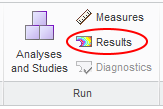
Results.png

Has anyone else encountered this?

Creo 2.0 M120, running with Windchill 10.1 M040, network installation.

3 replies

1-Visitor
September 4, 2015

Hello Jonathan


I can confirm this annoying issue. You cannot call he result in Simulate or from directly Creo and I do not know any other solution than a new Creo start. I had this issue in several data codes – including my current one (M150).


Indeed the problem is more likely to appear after you need to call several times the result – although it already happened even after the 2nd-3rd time.


Even during a Creo Simulate update course that happened at least with 3 other users - in the same afternoon!


I never contacted PTC support because I have nothing useful to submit (a model) and I´m afraid they are aware of the problem due to the reaction of the
instructor during this Simulate update course…


If someone has a better walk around I´ll be very glad to read.


Regards

R. Rabe

13-Aquamarine
September 4, 2015

Thanks for the confirmation.  Maybe I'll submit a call anyway, now that someone else has said it happens to them too - it's the best way we have to bring PTC's attention to problems.

... Right.  C12726878 opened.

13-Aquamarine
September 7, 2015

I've had the following reply:

I would suggest to use same driver version as mentioned in bellow PDF:

http://support.ptc.com/WCMS/files/138215/en/dell_creo2.pdf

  Can we consider the issue resolved for now? If it will reappear, please go ahead and reopens the Case.

I'll ask my IT to install the appropriate driver and see where we go from there...

1-Visitor
September 25, 2015

Hello.

It has just happened to me for the first time after a few months of Simulate 2.0 use...

CREO 2.0 M110 on an HP Z400 / Quadro 2000 / Nvidia 353.30 driver / Win7

It may not be related, but I also encountered crashes while dealing with two assemblies in Simulate (in separate windows).

6-Contributor
January 27, 2023

Not sure if anyone is still interested in this thread, but for any future people that land here, I have found that this resolves itself by disconnecting from Windchill and working off line resolves the issue.  I saw another thread that indicated that there may be too many files in the active workspace that relate to the issue.


My 2ct.


Jason