1-Visitor
July 21, 2015
Solved

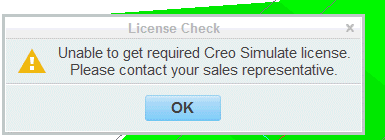
Simulation license-worked in Creo 3, in Creo 2 "unable to get required Creo Simulate license"

  • July 21, 2015
  • 3 replies
  • 2189 views

Exactly how it says,

BTCreo2Issue.gif

Released license, but when running simulation in Creo 2 I get this error

Best answer by MartinHanak

Kyle,

information about Simulate license is saved in feature.dat file located in Creo2_LOADPOINT\Creo 2.0\Common Files\Mxxx\mech\text\licensing\mech directory. Check the contents of the file.

Example of feature.dat file containing Creo Simulation Basic license"

MEC_BASIC_UI "MECBASICUI_License"
MEC_BASIC_ENG "MECBASICENG_License"
STRUCT_UI "<No license features>"
STRUCT_ENGINE "<No license features>"
STRUCT_THERMAL_UI "<No license features>"
STRUCT_THERMAL_ENGINE "<No license features>"

Martin Hanak

3 replies

24-Ruby III
July 23, 2015

Kyle,

information about Simulate license is saved in feature.dat file located in Creo2_LOADPOINT\Creo 2.0\Common Files\Mxxx\mech\text\licensing\mech directory. Check the contents of the file.

Example of feature.dat file containing Creo Simulation Basic license"

MEC_BASIC_UI "MECBASICUI_License"
MEC_BASIC_ENG "MECBASICENG_License"
STRUCT_UI "<No license features>"
STRUCT_ENGINE "<No license features>"
STRUCT_THERMAL_UI "<No license features>"
STRUCT_THERMAL_ENGINE "<No license features>"

Martin Hanak

Mahesh_Sharma
22-Sapphire I
July 24, 2015

Kyle,

Just add the value (MECBASICUI_License and MECBASICENG_License) from Martin's example should fix the issue. If you don't have write permission in that folder save feature.dat top desktop and later move that in folder.

Mahesh_Sharma
22-Sapphire I
August 5, 2015

Kyle,

Are you able to manage Simulate license issue?