
1-Visitor
October 26, 2015
Solved

Sketcher Palette - scale

  • October 26, 2015
  • 8 replies
  • 3252 views

Hi, it is possible to set default value for resize to 1? I have to always rewrite it manually.

It looks like scale is dependent on screen. Similar problem is when I copy symbols from one drw to another with different format.
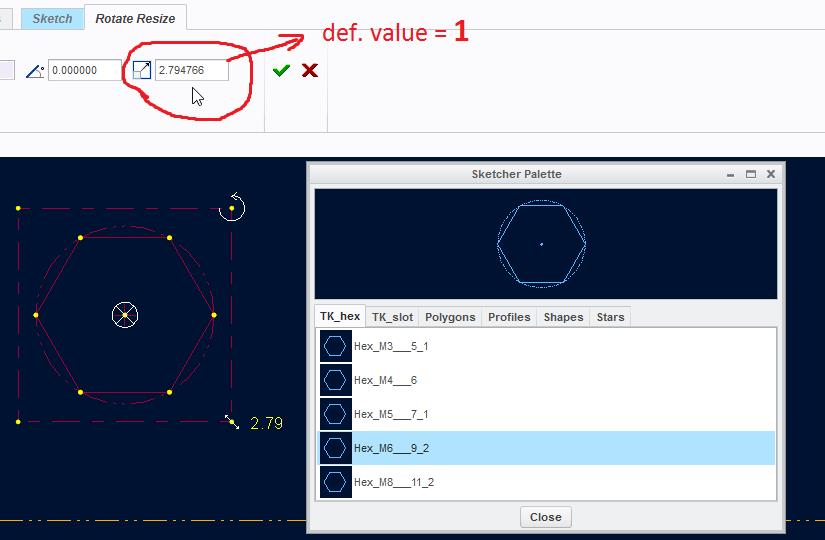

ScreenShot861.jpg

    Best answer by StephenW

    There is a product idea on this one. Makes perfect sense that it should default to 1 in all cases.

    Ability to set default scale for sketcher palette items

    8 replies

    1-Visitor
    November 30, 2015

    Nobody knows?

    StephenW
    23-Emerald III
    November 30, 2015

    Unfortunately I don't think it's possible to set the default.

    1-Visitor
    November 30, 2015

    Brian Martin‌, this is probably one for your annual enhancement request list. I'm not saying the default should be 1:1, but I think there should be a config option for this.

    StephenW
    StephenW23-Emerald IIIAnswer
    23-Emerald III
    December 1, 2015

    There is a product idea on this one. Makes perfect sense that it should default to 1 in all cases.

    Ability to set default scale for sketcher palette items

    1-Visitor
    December 3, 2015

    Thank you, I am going to vote for it.

    1-Visitor
    December 5, 2015

    If there was more traction for AutoIt then this would be trivial - have a program running that waits for various windows and when one turns up that has a Rotate Resize tab, it takes one shot at changing the scale to 1. I had a bunch of these routines to fix WF5 interface problems, like moving the separate component assembly window to another monitor or bringing the pop-under requesters to the front or moving them so they didn't overlap the geometry I was working on.