12-Amethyst
May 14, 2015
Solved

Updating license to test Creo 3.0 M030

  • May 14, 2015
  • 9 replies
  • 5423 views

Trying to test Creo 3.0 M030, but can't get my current licensing to work. Currently using Creo 2.0 M090 but but installed Creo 3 for testing purposes. Just need to know what to do to get my license updated to allow Creo 3 and Creo 2 to be used.

I get an error message of "License file does not support this version" and I don't remember having to update my license file before, but it has been a while since we jumped to Creo 2... Opened a support case and haven't even received an email back or had the case assigned yet so figured I would ask here.

Thanks,

Erik

Best answer by TomU

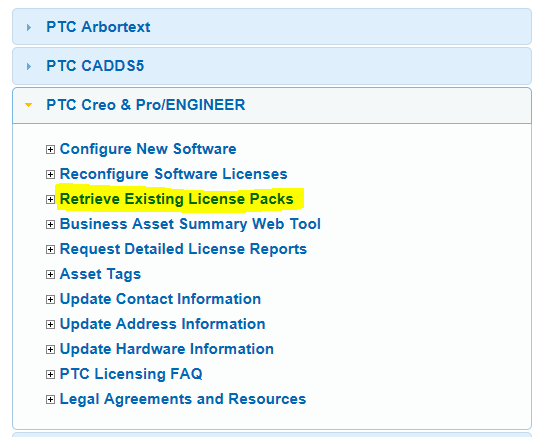
Go here and request a new license: https://support.ptc.com/appserver/cs/lm/index.jsp

lic.PNG

t's automated and will be sent in probably 10 minutes or less.

9 replies

TomU23-Emerald IVAnswer
23-Emerald IV
May 14, 2015

Go here and request a new license: https://support.ptc.com/appserver/cs/lm/index.jsp

lic.PNG

t's automated and will be sent in probably 10 minutes or less.

MarcoTosin
21-Topaz I
May 14, 2015

Erik,

you can search for many similar discussion here in the community, in the upper right corner box.

Anyway, you must be on active maintenance to get newer license.

If you are in this case, you have to request an update license from support web page.

https://support.ptc.com/appserver/lm/rsl/reconfig.jsp

Marco
Mahesh_Sharma
22-Sapphire I
May 14, 2015

Erik,

The error "License file does not support this version" will appear in Creo 3.0, if the license on server is not compatible with Creo 3.0.

To make ir up and running, retrieve a new license file (as mentioned by Tom) and update license server.

> If you are using older version of license manager (Flexnt lmgrd based)

1. Run ptcsetup.bat from <Flexnet Installation directory>\bin

2. Browse to new license file and configure.

> If you are using new license server (Installed using Creo 2.0 CD, Flexnet Admin based)

1. Execute reconfigure.exe from <Flexnet Admin Installation directory>\bin > Next

2. Remove old entry and Drag new license file and drop under License summary > Install.

As you mentioned you have already submitted a case and if there were no response from support, directly call technical support and ask for installation help.

17-Peridot
May 15, 2015

I will echo what Mahesh suggested. I open a support case to do the Creo 3.0 install. The technician was able to get my license file updated by session sharing.
The tech was able to get the information before the license file was emailed to me by PTC.

I all, it took a while to install from the CD, but tech support stayed online until we confirmed that Creo 2.0 and Creo 3.0 could run on the same machine. The only thing we did not iron out is the shared user configuration files for the ribbon modifications. My Creo 3 sessions share the same settings as Creo 2. I am specifically not customizing Creo 3 UI to preserve my Creo 2, which is a production environment for me.

1-Visitor
May 15, 2015

Antonius stated " The only thing we did not iron out is the shared user configuration files for the ribbon modifications. My Creo 3 sessions share the same settings as Creo 2. I am specifically not customizing Creo 3 UI to preserve my Creo 2, which is a production environment for me."

To get around this, use a different start directory for Creo 2 and Creo 3 with config files for each in their own start up directory.

12-Amethyst
May 15, 2015

Thank you all for the assistance. I wasn't aware that the Retrieve License Pack option would actually update it for use with a newer release.

You guys are usually a lot more helpful than Tech Support! Who finally contacted me 10 minutes ago... 2 days after opening the ticket.