

6-Contributor
April 23, 2023
Solved

What if the angle dimension does not display the suffix zero?

  • April 23, 2023
  • 1 reply
  • 1850 views
I am using Creo Parametric Release 9.0 and Datecode9.0.2.0

What if the angle dimension does not display the suffix zero? I filled in 'ang_unit_trail_zero' and changed it to 'yes', but it didn't work. I tried searching for' draw_ang_unit_trail_zero 'but couldn't find it. I hope everyone can answer this question. Thank you.
    Best answer by MartinHanak

    @CT_10646942 wrote:

    hi,this is Drawing mode


    Hi,

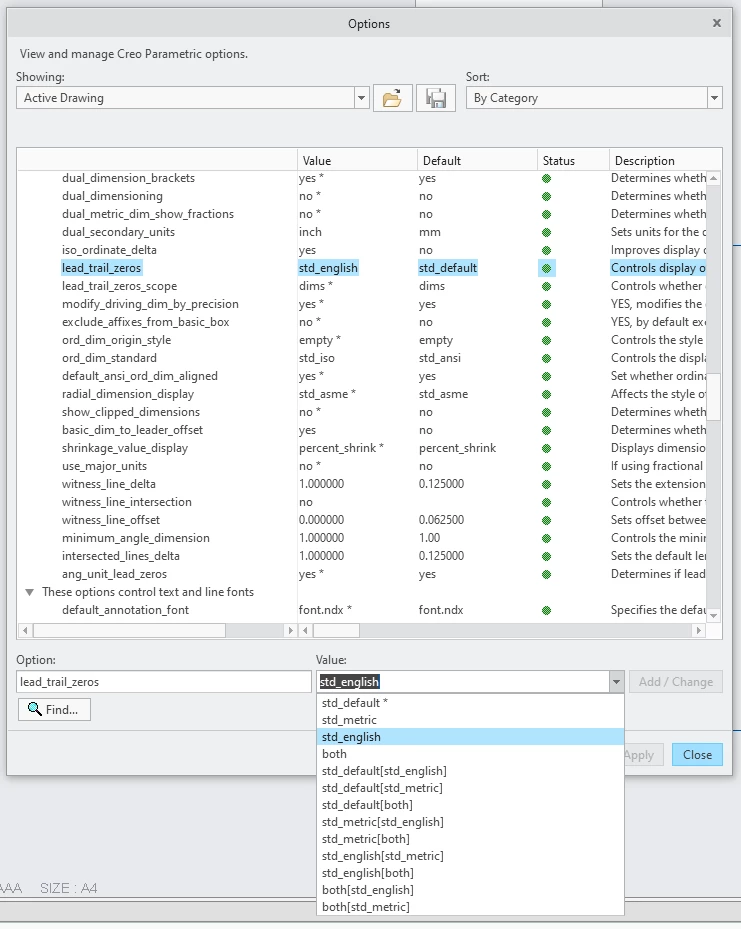
    in Drawing mode click File > Prepare > Drawing Properties > Detail Options change and set lead_trail_zeros option according your needs.

    MartinHanak_0-1682327800660.png


    1 reply

    KenFarley
    21-Topaz II
    April 23, 2023

    I have settings in my config.pro file that might affect this type of behavior:

    default_ang_units ang_deg
    default_dec_places 3
    minimum_angle_dimension 0.020
    round_displayed_dim_values no
    tol_display yes
    

    You could try these, but be aware, to change them in an already existing part you need to explicitly edit the settings (File->Prepare) to change them for an existing model, or load the settings into your part.

    In general to change a single dimension, you can select it then set the number of decimal places via the settings in the ribbon at the top of the window.

    6-Contributor
    April 24, 2023

    Thank you for your answer. My main idea is to eliminate the excess 0 after angle annotation. For example, in the following image, the right angle is 90 °, and I would like to label it as 90 ° instead of 90.00 °,and when it is not an integer angle, I still keep two significant digits. I have changed your configuration, but the angle display remains unchanged when re labeling...

    CT_10646942_0-1682299101187.png


    24-Ruby III
    April 24, 2023

    @CT_10646942 wrote:

    Thank you for your answer. My main idea is to eliminate the excess 0 after angle annotation. For example, in the following image, the right angle is 90 °, and I would like to label it as 90 ° instead of 90.00 °,and when it is not an integer angle, I still keep two significant digits. I have changed your configuration, but the angle display remains unchanged when re labeling...

    CT_10646942_0-1682299101187.png


    Hi,

    is your question related to Part mode or to Drawing mode?