
20-Turquoise
September 8, 2016
Solved

Where does "Expand the browser during startup" get saved?

  • September 8, 2016
  • 3 replies
  • 6758 views

Creo Parametric 3.0 M100

When you change:

File > Options > Windows Settings > "Expand the browser during"

Where does this get saved?
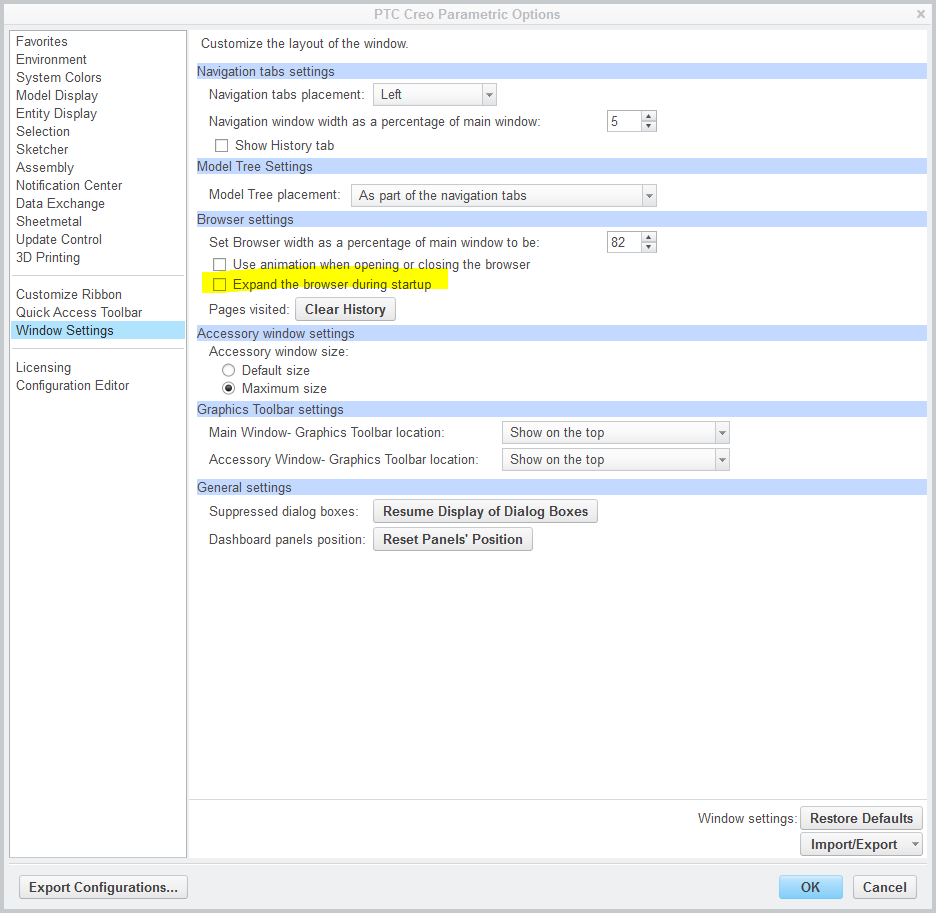
expand_browser.png


This thread is inactive and closed by the PTC Community Management Team. If you would like to provide a reply and re-open this thread, please notify the moderator and reference the thread. You may also use "Start a topic" button to ask a new question. Please be sure to include what version of the PTC product you are using so another community member knowledgeable about your version may be able to assist.

Best answer by TomU

In this:

3 replies

TomU23-Emerald IVAnswer
23-Emerald IV
September 8, 2016

In this:

20-Turquoise
September 8, 2016

Tom Uminn wrote:

In this:

That was my original thought also however changing this does NOT create a creo_parametric_customization.ui. At least not one that I can find...

23-Emerald IV
September 8, 2016

It definitely does.  I just tested it.  Easy way to prove it is to set the config option load_ui_customization_run_dir yes.  This will force the creo_parametric_customization.ui to be read from and written to the working directory.  (By default it will end up other places.)  Changing just this one setting and then hitting "Okay" generated a new ui file.

12-Amethyst
September 8, 2016

Creo Parametric automatically saves all user interface custom settings to the creo_parametric_customization.ui file that is located in the <user>\AppData\Roaming\PTC\ProENGINEER\Wildfire\.wf\.Settings. The customizations of the ribbon, Quick Access toolbar, and Graphics toolbar that you make without opening the Creo Parametric Options dialog box are also automatically saved. 

If the value of the load_ui_customization_run_dir configuration option is set to yes, then Creo Parametric saves the creo_parametric_customization.ui file to the run directory. 

You can save creo_parametric_customization.ui as creo_parametric_admin_customization.ui and place it at creo loadpoint/text to store the CAD administrator settings. The creo_parametric_customization.ui file overrides the creo_parametric_admin_customization.ui file.

(per the Creo help center)

23-Emerald IV
September 8, 2016

Thanks for looking that up Ron St.Pierre‌.  I haven't checked in a while but I think you can also end up with one inside the Windchill cache folders as well (unless you enable load_ui_customization_run_dir option).

12-Amethyst
September 8, 2016

Tom, you are correct, it puts it in .wf/.settings

Learned a lot in these little searches.

What I thought I was doing, using the admin ui, potentially does not provide what I was trying to do:

provide a daily restart point.

instead, when a user modifies the ribbon, lets say, it could potentially wipe out efforts provided in the admin ui by users with their own ribbons, disabling default map keys commands tied into the ribbon icons

Thankfully, most users don't play with it, and the advanced users recognize that mapkeys were assigned.

20-Turquoise
September 8, 2016

Apparently I had temporarily forgotten how find a file name in alphabetical order because sure enough I do have a creo_parametric_customization.ui setting in the working directory. For some reason I could not see it before. DUH....

I have load_ui_customization_run_dir set to yes so I was looking in the working directory. I had also looked in <user>\AppData\Roaming\PTC\ProENGINEER\Wildfire\.wf\.Settings to no avail.


The reason I was looking for this is because of this:

https://support.ptc.com/appserver/cs/view/solution.jsp?n=CS244548

I can reproduce this problem almost at will here with Creo Parametric 3.0 M100 but only if running from a network "install" (which the majority of the users are setup with) . Running from a local "install" doesn't exhibit this issue. Earlier versions ie M090 do not have this problem.

I could leave the users on M090 however I just upgraded from Windchill 11.0 F000 to 11.0 M010 Friday night and have discovered the new creo view agent and Creo View 3.1 M010 (https://support.ptc.com/appserver/cs/view/solution.jsp?n=CS237817) don't work with Creo Parametric 3.0 M090. It has to be Creo Parametric 3.0 M100 or greater in order for these to work.

So I will unset the "Expand the browser during startup" in my creo_parametric_admin_customization.ui and roll out M100. I have web_browser_homepage set to an internal wiki page "Creo Parametric Latest News" in which I announce changes, updates, etc. I will lose this "in your face" latest news page until this issue is fixed.

Thanks to all of you for making me realize this was actually creating a creo_parametric_customization.ui.

23-Emerald IV
September 8, 2016

Interesting.  I haven't run into that problem apparently because we have all those extra tabs disabled.  I do have the web_browser_homepage set to go straight to the Windchill homepage.

enable_3dmodelspace_browser_tab no

enable_partcommunity_tab no

enable_resource_browser_tab no

web_browser_homepage http://<server name>/Windchill/app/#ptc1/homepage

20-Turquoise
September 8, 2016

Tom Uminn wrote:

Interesting.  I haven't run into that problem apparently because we have all those extra tabs disabled.  I do have the web_browser_homepage set to go straight to the Windchill homepage.

enable_3dmodelspace_browser_tab no

enable_partcommunity_tab no

enable_resource_browser_tab no

web_browser_homepage http://<server name>/Windchill/app/#ptc1/homepage

In my case this only happens when

  • running from a network install
  • pro_format_dir is set to Windchill ie
    • wtpub://Windchill/Libraries/SomeLibrary/SomePath

and and the only thing I need to do to "fix" the hang is to uncheck "Expand the browser during startup". None of the other config.pro settings above make a difference. Do you have pro_format_dir pointing to wtpub://
