17-Peridot
April 13, 2017
Solved

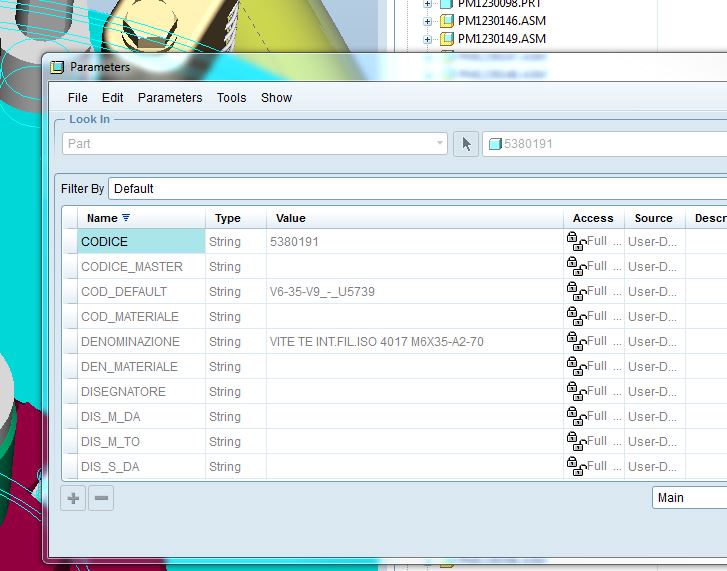
Width of columns
larghezza_colonne.JPG

Hi all,

I wonder if there is the option, within the config.pro or other, to set the width of the columns when you open the parameters windows.


Thanks

Bye

TomU
TomUAnswer
23-Emerald IV
April 13, 2017

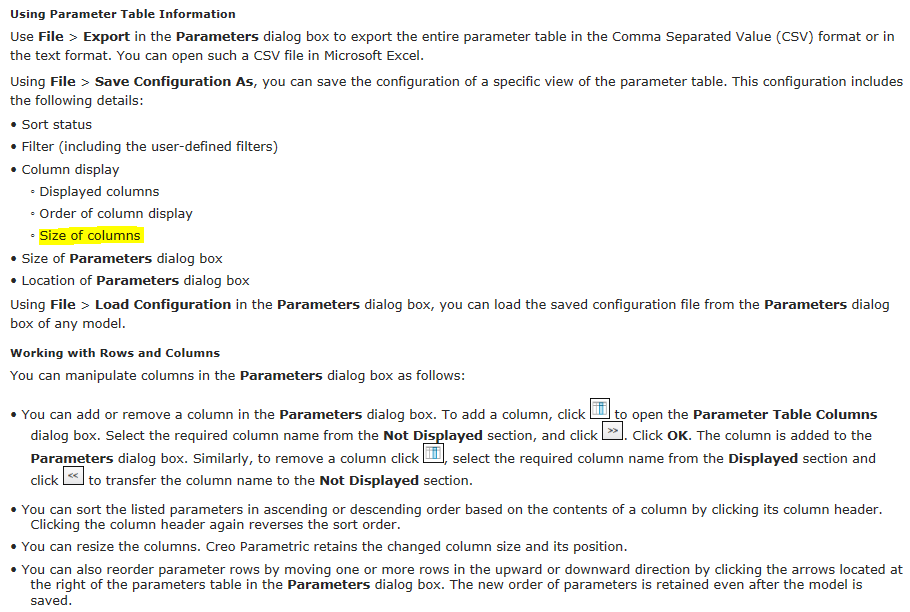
Yes you can.  You can save the currently layout as an XML file and then automatically load it with the config option parameter_dialog_setup_file.

------------------------------------------------------------------------------------------------------------------

------------------------------------------------------------------------------------------------------------------

Creo Parametric Help Center

22 replies

TomU
TomU23-Emerald IVAnswer
23-Emerald IV
April 13, 2017

Yes you can.  You can save the currently layout as an XML file and then automatically load it with the config option parameter_dialog_setup_file.

------------------------------------------------------------------------------------------------------------------

------------------------------------------------------------------------------------------------------------------

Creo Parametric Help Center

Translate
21-Topaz I
April 13, 2017

Tom,

I never knew about this so thank you.

However, the column size won't stay as wide as I set it.  Still using Creo 2.

Translate
23-Emerald III
April 13, 2017

Are you saving the XML file and then restarting Creo2 each time you adjust a width?

I have found it easier to adjust the column width by editing the XML file directly in notepad/wordpad.

Translate
gfraulini17-PeridotAuthor
17-Peridot
April 14, 2017

I've tried but it doesn't work...

parameters.JPG

Translate
21-Topaz I
April 14, 2017

Have you tried a capital "N" for Name instead of "name"?  That would match what it shows in the table.

So is there a bug?

Translate
gfraulini17-PeridotAuthor
17-Peridot
April 14, 2017

Yes, but it doesn't work yet

Translate
23-Emerald III
April 14, 2017

Steve, did you get it to work?

I will look further at my work system and post the file here. It works fine in Creo 2. In my case, we did have a mapkey to set the column widths and then I saved the configuration after running the mapkey and I wonder if that is why I get the column display lines.

When I create a new file in Creo 2, 3 & 4, the syntax is identical and only the one column_name line, like in Steve's listing. I tried to add the width setting, but it did not work.

Translate
23-Emerald III
April 14, 2017

Here is the top portion of a hand-edited file based on the one I saved from Creo2.

I added the column name lines after changing the <displayed_columns/> line to just <displayed_columns> and adding the </displayed_columns> line at the end.

When I started Creo4, opened a file and went to Tools-Parameters, I got the window to display as set.

Translate
gfraulini17-PeridotAuthor
17-Peridot
April 14, 2017

The underscore between the word column and name doesn't take; so the word name becomes red (editing with Notepad++ as in the pics).

Furthermore the name of the columns, inside the inverted commas, must starts with the lowercase letter.

Translate
23-Emerald III
April 14, 2017

My mistake on the underscore between column and name yesterday. See the sample partial listing I just added for the proper syntax.

Translate
21-Topaz I
April 14, 2017


This is what the file looks like after setting the columns widths and the sorting then saving the config file.  Noticed the slash at the end of <displayed_columns>.


I made it look like this but the sorting was not recognized.

The slash in <displayed_columns/> is in the wrong spot.  I had to move the slash to the front: </displayed_columns> Once I moved the slash the sorting was recognized.


Translate