7-Bedrock
Nov 5, 2026 11:16 AM UTC
Solved

Windchill Quick Toolbar in Creo Parametric 10

Hi,

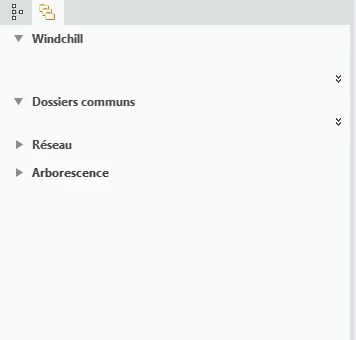
I have a question about Windchill Quick Toolbar in Creo Paramteric. Since installation Creo Parametric 10 version in our Company, There is, sometime, a visualization bug, the links disappear without a reason like screenshot.

Have you say why ?

Thanks a lot
 

    Mahesh_Sharma
    22-Sapphire I
    Nov 10, 2026 11:50 AM UTC

    Hi ​@Alex_B.92350 


    You may try clearing the cache by renaming .wf to something else. Just make sure your data is checked-in to commonspace prior renaming the folder. 

    Default location is C:\Users\USERNAME\AppData\Roaming\PTC\ProENGINEER\Wildfire

    OR it can specify by variable PTC_WF_ROOT. 


    Thanks. 

    4 replies

    MarcoTosin
    21-Topaz II
    Nov 5, 2026 11:35 AM UTC

    As stated in the colored bar, please do NOT ask specific questions about PTC products in this section, because no one will answer you.

    Should I ask the community moderators to move this to the Creo or Windchill forum?


    Translate
    Marco
    7-Bedrock
    Nov 10, 2026 9:02 AM UTC

    Hi,

    Ok, i think that i created my question in good topic, sorry for my mistake.

    Can you move it in Creo or Windchill topic to have better results.

    Thanks for this.

    Translate
    MarcoTosin
    21-Topaz II
    Nov 10, 2026 9:04 AM UTC

    The community moderators have already done that.


    Translate
    Marco
    Mahesh_Sharma
    22-Sapphire I
    Nov 10, 2026 11:50 AM UTC

    Hi ​@Alex_B.92350 


    You may try clearing the cache by renaming .wf to something else. Just make sure your data is checked-in to commonspace prior renaming the folder. 

    Default location is C:\Users\USERNAME\AppData\Roaming\PTC\ProENGINEER\Wildfire

    OR it can specify by variable PTC_WF_ROOT. 


    Thanks. 

    Translate