
3-Newcomer
May 8, 2026
Question

Workspaces

  • May 8, 2026
  • 2 replies
  • 92 views

I have old ProE workspaces but I cannot open them. I get this error
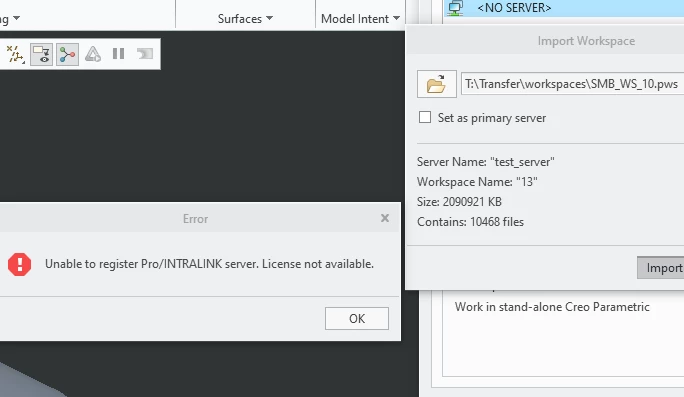
error message

Is there anyway to open these? I know there are files in there because I was able to open them with an old copy of ProE. That is no longer an option. Any ideas?

2 replies

16-Pearl
May 12, 2026

Hi ​@GM_10996600,

According to a knowledgebase search for that error message, it appears that you may not have the license feature 247 Pro/Intralink Connect 

CS49269

CS31815

Community Moderator
June 1, 2026

Hi ​@GM_10996600,

I wanted to see if you got the help you needed.

If so, please mark the appropriate reply as the Accepted Solution. It will help other members who may have the same question.
Of course, if you have more to share on your issue, please pursue the conversation.

Thanks,
Anurag 

3-Newcomer
June 1, 2026

No not really, I got this:


Article - CS49269 - Unable to register Pro/INTRALINK server with Creo Parametric


Cause

  • Pro/ENGINEER, Creo Elements/Pro or Creo Parametric require floating license option Pro/INTRALINK Connect Module or feature name 247

Resolution

  • In order to use Pro/ENGINEER, Creo Elements/Pro or Creo Parametric in a linked session with Pro/INTRALINK 8.0+, an optional floating module is required:
    • Pro/INTRALINK Connect Module or feature name 247
    • Contact License Management to get this module included in the Creo License file and make sure this module is purchased
  • Notes:
    • The display name in Creo Parametric ptcsetup under Select Licenses window is Pro/INTRALINK_8_0 or Pro/INTRALINK_9_0 or feature name 247

But my tech support service has not responded to see if I can get this feature installed.