
1-Visitor
March 6, 2018
Solved

Can we create a user when there a admin lock on the server

  • March 6, 2018
  • 2 replies
  • 4663 views

Hi guys ,

As all we know,when the user are logged into integrity user details will automatically imported from the LDAP.

There will be some user like business owner.. this kind of  user doesn't have any business with Integrity. But we need there details to display in integrity. So its not good idea to say them please login into integrity. So have wrote the code to add the user into integrity. Now the issue is we can't create the user when server has admin lock on the integrity.


So now i need to create a user when there is admin lock on the server .If it is not possible can we automate a migration process. like dev to staging ,staging to production . Does any one has any idea about this.


Thanks


Best answer by MichaelChatel

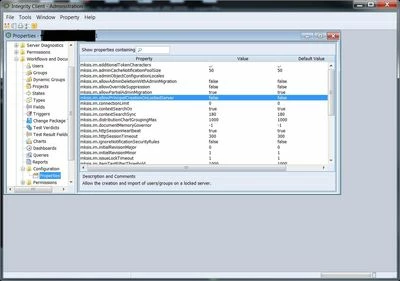
The property is available in 10.7 too.  Here's a screenshot showing where in the Admin GUI you can find it.  If you still don't see it, I'd suggest opening up a Support case, as perhaps your server is mis-configured or something else is going on.


screenshot_property.jpg

2 replies

5-Regular Member
March 6, 2018

Hi Shree,


You likely want to check out this knowledge article;


https://www.ptc.com/en/support/article?n=CS91512


Since Integrity 10.5, we've had the "mksis.im.allowPrincipalCreationOnLockedServer" property, that one can set, to allow users to be created on a locked server in an admin staging environment, where there is a need for it.


Shree1-VisitorAuthor
1-Visitor
March 11, 2018

This property is not there in 10.7 version. is there any other way.

5-Regular Member
March 12, 2018

The property is available in 10.7 too.  Here's a screenshot showing where in the Admin GUI you can find it.  If you still don't see it, I'd suggest opening up a Support case, as perhaps your server is mis-configured or something else is going on.


screenshot_property.jpg

1-Visitor
March 9, 2018

Hi @Shree,


You can handle this scenario by setting some properties using GUI as well as CMD command as @MichaelChatel also said. Please take a look over the article and i hope this will definitely solve your issue.


Regards,

Kapil