1-Visitor
June 19, 2018
Solved

Conflict automatic merge

  • June 19, 2018
  • 1 reply
  • 2089 views

Hello everyone,

 suppose to have this scenario:

  •   A developer checks out (non exclusive lock) a file locally, and modifies it.
  •   Another developer checks out the same file (non exclusive lock), modifies it and makes a check in.
  •   The first developer tries to check in the file from local to remote after the other developer.

Now the question is:

 If there are no conflict Integrity perform an automatic merge (as GIT do) highlighting the difference by compare the content?

 I take for granted that conflicts must be resolve manually.


Thank you !
 

Best answer by awalsh

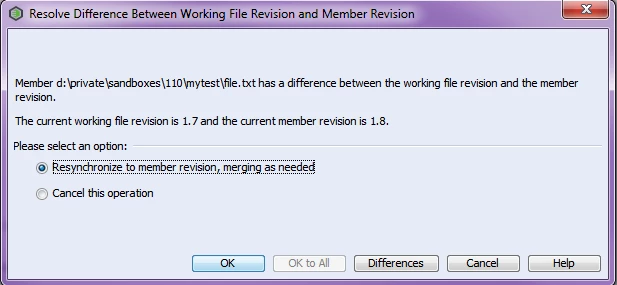
The default settings are that the first developer will be prompted to resynchronize to member revision, merging as needed:


resynchronize.PNG


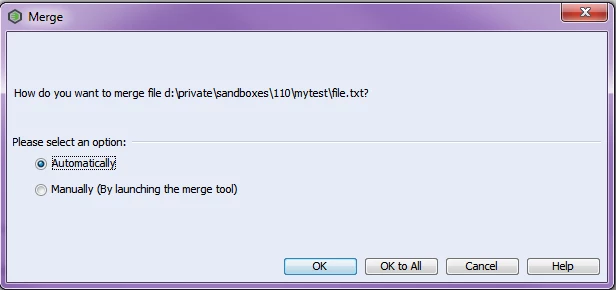
If they choose to resynchronize and merge, they will be prompted to choose the type of merge:

merge.PNG


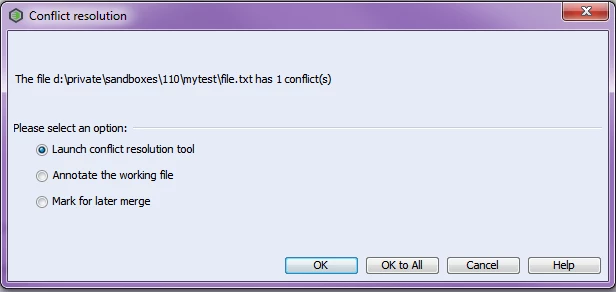
If they choose Automatic and there are conflicts, they will then be prompted to launch the conflict resolution tool. 

conflictresolution.PNG


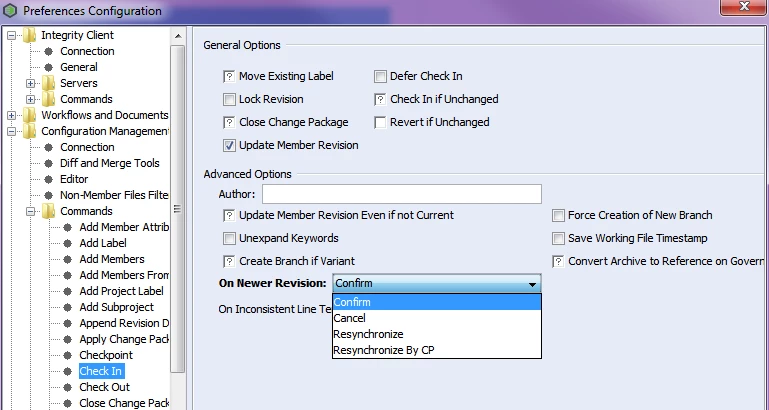
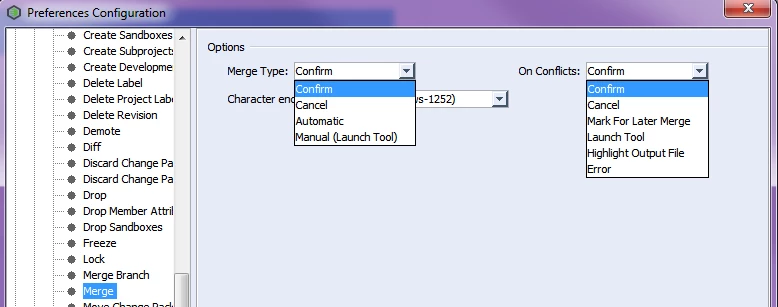
You can change the defaults in the user preferences. Select File > Preferences. Expand Configuration Management then Commands. The Check In and Merge commands are the ones to change. If you want everything as automatic as possible, then choose On Newer Revision: Resychronize for the Check In preference, and Merge Type: Automatic. 


preferences_checkin.PNG


preferences_merge.png

1 reply

awalsh5-Regular MemberAnswer
5-Regular Member
June 19, 2018

The default settings are that the first developer will be prompted to resynchronize to member revision, merging as needed:


resynchronize.PNG


If they choose to resynchronize and merge, they will be prompted to choose the type of merge:

merge.PNG


If they choose Automatic and there are conflicts, they will then be prompted to launch the conflict resolution tool. 

conflictresolution.PNG


You can change the defaults in the user preferences. Select File > Preferences. Expand Configuration Management then Commands. The Check In and Merge commands are the ones to change. If you want everything as automatic as possible, then choose On Newer Revision: Resychronize for the Check In preference, and Merge Type: Automatic. 


preferences_checkin.PNG


preferences_merge.png

5-Regular Member
June 19, 2018

One more thing: After the merge is done, whether automatic or manual, the Check In is marked as Deferred. The user must select Member > Submit Deferred or submit the change package to complete the Check In.