

Constrain Category by Project with addtional rule-constraint > "new item" line shows full list
The field Category is already constrained for each type, e.g. for "Customer Input":

Now I want to further contrain the category by Project using a rule relationsship, e.g.:

Now I assume, that when I have a Customer Input Document in the Recycle Bin project I can only see three categories (Capability, Comment, Heading), while in all other projects I see the full list. BUT: when I open a Customer Input Document in Recycle Bin I can still see the full list for the "New" item row:
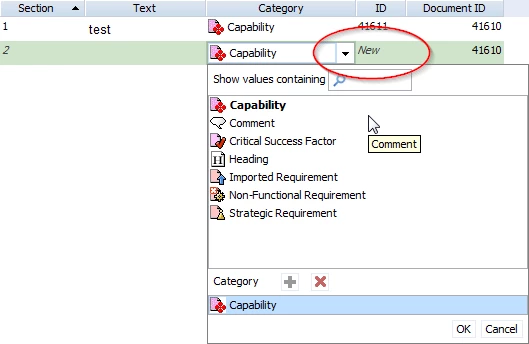
Anyway the constrain works when saving, that means I get an error when I choose for example the "Critical Success Factor" from the list.
When I edit an existing item the pick list is shown as expected:
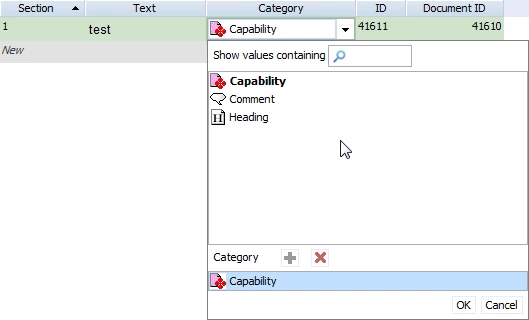
The reason must be, that the new item will be assigned to the project only when saving this item. Before it doesn't have a project. Anyway, is there any possiblity to hide the categories that are not allowed in this document?
Thanks, Timo