Question
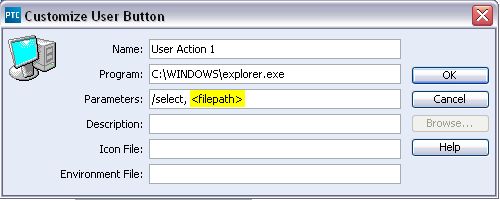
Custom action - Open in windows explorer
I'm fairly new to PTC Integrity, but I was trying to create a custom user action that would allow us to select a member and open it in Windows explorer via right-click popup menu (or toolbar button). I've gotten as far as Viewset > Customize > Actions > Custom > Edit... so it looks like the following. Windows explorer will take a string parameter of "/select, " followed by a filepath. Is there a "variable" name that I can use here so it opens to the directory that the selected member is located? Or is this functionality already built in somewhere?? We are using Integrity 10. Any suggestions or help will be greatly appreciated.