
1-Visitor
March 7, 2014
Solved

Edit preferences - proxy setting via cli

  • March 7, 2014
  • 1 reply
  • 8157 views

Hello,

I need the command that will set the hostname and port for proxy server via integrity cli and also check the box "Use default proxy for all unlisted connections" like shown in the attached picture.

I would also like to ask, if it is possible with PTC Integrity 10.4 , to import a viewset in the client using command line interface ?

Please help me with these questions.

Thank you very much in advance for responses!
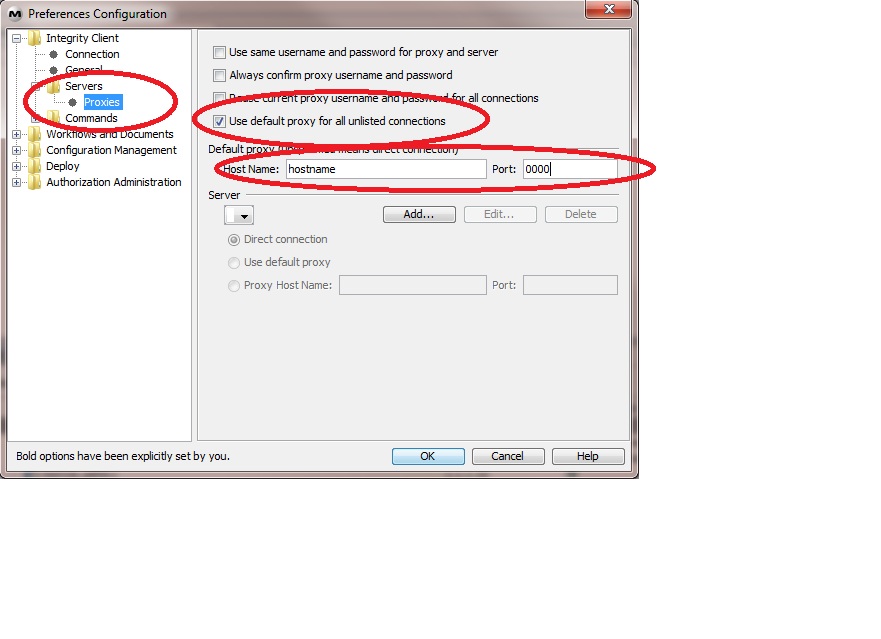
Proxy_setting.jpg

found the commands:

-- proxy setting:

si diag --diag=setproxy --param=$HOST:$PORT --param=$FSA:$FSAPORT --target=client

Message was edited by: Ficut Bianca

    Best answer by cpabst

    Hi,


    you can use the following command to set this setting:


    si diag --diag=setproxyprefs --target=client --param(proxyUsedefault|proxyConfirmuser|proxyGlobaluser|proxySameuser) [--param=(true|false)]


    So set final command woudl be:


    si diag --diag=setproxyprefs --target=client --param=proxyUsedefault --param=true


    Unfortunately this command is only documented in the Release Notes of 2007 SP6:


    http://www.mks.com/support/productinfo/docs/releasenotes_S040900011-01.pdf


    (page3)


    If it does not work for some reason please just le me know.


    Best Regards,

    Chris

    1 reply

    cpabst1-VisitorAnswer
    1-Visitor
    March 20, 2014

    Hi,


    you can use the following command to set this setting:


    si diag --diag=setproxyprefs --target=client --param(proxyUsedefault|proxyConfirmuser|proxyGlobaluser|proxySameuser) [--param=(true|false)]


    So set final command woudl be:


    si diag --diag=setproxyprefs --target=client --param=proxyUsedefault --param=true


    Unfortunately this command is only documented in the Release Notes of 2007 SP6:


    http://www.mks.com/support/productinfo/docs/releasenotes_S040900011-01.pdf


    (page3)


    If it does not work for some reason please just le me know.


    Best Regards,

    Chris

    BiFi1-VisitorAuthor
    1-Visitor
    March 21, 2014

    hello,

    thank you so much for replying, I found this command in the mean time also and it works...yeah...it was not easy to find it.

    I have another challenge now: I have to make a viewset available ( as in being displayed) from the CLI.

    I use integrity fetchviewset to import the viewset and make it available in the client menu ViewSet -> Open it will be displayed on the list and the user has to select it and actually open it for display. But I want to skip this user action and make the viewset to be displayed when he opens the client, without him having to actually open the viewset. Is that possible? I also could not find this in the documentation.

    Thank you very much for reply in advance!

    1-Visitor
    March 25, 2014

    Hi,

    Regarding the viewset, we've been trying this in the past as well, but ran into some troubles.

    Working on this has recently restarted. It looks like there is no 'official' way to accomplish this.

    The basic approach we are following now, is to manually import them. The approach is the following.

    - ensure the client is shutdown

    - copy the viewset files into this folder (C:\Users\<userID>\.mks\viewset\user\) - make sure to copy .vs and .vso file

    - modify the IntegrityClient.rc file - add/modify the 'mks.gui.openViewSets=' with the viewsets you want to enable for the users

    The main problem with approach is the question how, to handle existing settings of the user (overwrite / respect / user choice).

    Furthermore there was the question wether it is possible to add these setting to the IntegrityClientSite.rc file, so newly created IntegrityClient.rc files are already setup correct.

    (Just as an inspiration, we invented a so called 'setup script'. The MKS icons on the Destop of our users, now no longer leads to the .exe-file, but to the script. The script takes care of Proxy settings (and in future of Cache and Viewset settings as well). Afterwards the client gets started.)

    (In addition the script is stored on a network drive.)

    Using this approach we have the chance to modify the client for each individual session.

    Even this is not direct answer to your question, maybe you some hints are helpful.

    If you have any further questions, please just let me know.

    Best Regards,

    Chris