1-Visitor
March 4, 2015
Solved

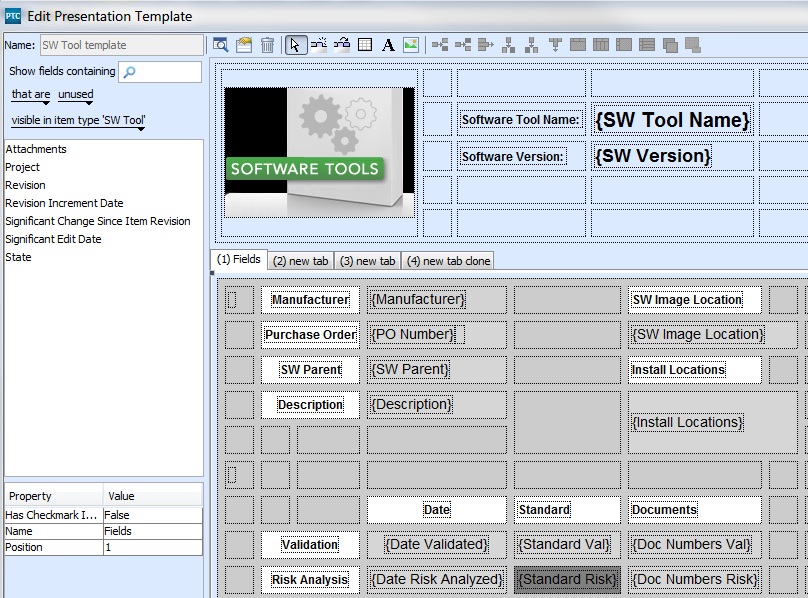
Edit Type > Presentation Editor interface is antiquated

  • March 4, 2015
  • 2 replies
  • 2386 views

Apparently every aspect of every cell, field, value etc. has to be set manually and one-at-a-time. Is there anyone who can tell me a 21st century way of creating/editing these presentations/templates/items?

    Best answer by pmerkle

    Hi Bob,

    to get the template file form the Integrity database you can use the command

    integrity getdbfile --forceConfirm=yes --batch --hostname="<hostname>" --port="<port>"

    --user="<user>" --password="password"

    --output=<diretory+filename>

    data/im/issue/templates/<template name>.xml

    After editing the xml file you can write it back to Integrity using the command:

    integrity putdbfile --forceConfirm=yes --batch --hostname="<hostname>" --port="<port>"

    --user="<user>" --password="password"

    --input=<diretory+filename>.xml

    data/im/issue/templates/<temple name>.xml

    You'll find the "integrity" command (integrity.exe) within the "bin" directory of the Integrity Client installation.

    Regards,

    Peter

    2 replies

    5-Regular Member
    March 5, 2015

    Hi Bob,

    the Integrity Presentation files are in XML format (see attachment). I think you (and we all, too) nwill have to live with this editor ...

    byoung1-VisitorAuthor
    1-Visitor
    March 5, 2015

    Thanks for the reply Peter,

    Is there any way to edit the XML directly? On the server I can't find where it is stored...in files? in db itself?

    pmerkle5-Regular MemberAnswer
    5-Regular Member
    March 5, 2015

    Hi Bob,

    to get the template file form the Integrity database you can use the command

    integrity getdbfile --forceConfirm=yes --batch --hostname="<hostname>" --port="<port>"

    --user="<user>" --password="password"

    --output=<diretory+filename>

    data/im/issue/templates/<template name>.xml

    After editing the xml file you can write it back to Integrity using the command:

    integrity putdbfile --forceConfirm=yes --batch --hostname="<hostname>" --port="<port>"

    --user="<user>" --password="password"

    --input=<diretory+filename>.xml

    data/im/issue/templates/<temple name>.xml

    You'll find the "integrity" command (integrity.exe) within the "bin" directory of the Integrity Client installation.

    Regards,

    Peter

    1-Visitor
    March 6, 2015

    I would like to "pile on" to this constructive complaint.

    In the modern era of UI development, why aren't Cascading Style Sheets and standard HTML5 used to layout the UI? This "Presentation Template", and associated ViewSet construct, are antiquated, extremely limiting, and not nearly as flexible as developers need in order to create a UI that meets the usability demands of the end-users.

    It would be a simpler and more flexible design approach to allow people to use HMTL, JavaScript and CSS.

    -Sean.