
1-Visitor
September 17, 2020
Question

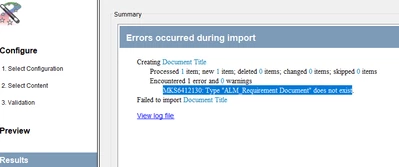
Error MKS6412130: Type "ALM_Requirement Document" does not exist. What is the reason behind it ?
  • September 17, 2020
  • 3 replies
  • 2567 views

Nilesh007_2-1600350666971.png


When I am trying to import a document(.docx) in integrity 11.2 , I am having a problem like this. I didn't understand. Why it's happening.


Thanks!!


3 replies

23-Emerald III
September 17, 2020

What software you talking about?

Nilesh0071-VisitorAuthor
1-Visitor
September 18, 2020

Talking about  (Integrity 11.2).

16-Pearl
September 18, 2020

Looking at the error message showing the type name with the "ALM_" prefix, my guess is that your system is configured without the prefix (so your type is "Requirement Document") and you're doing an import with a default gateway mapping that specifies the prefix.

If that's the case, you have to edit/create your own mapping and remove "ALM_".

On the server, the mappings are under "...\data\gateway\mappings", on the client, under "...\config\gateway\mappings", where "..." indicates the server or client root directory.

Then, one directory above, there's the file "gateway-tool-configuration.xml" that puts them together with the parsers.

I know, a major headache! I hope you have someone to help you.

5-Regular Member
October 19, 2020

LLawton is likely right, in that one of the type mappings may be pointing to an incorrect, or out-dated type name, not matching what is currently configured as the type name, on your Integrity server.


I'd suggest opening a Support case, with PTC Integrity (Windchill RV&S) support.


Mike


Nilesh0071-VisitorAuthor
1-Visitor
October 20, 2020

Thank you MichaelChatel.

I will open a Support case, with PTC Integrity.