

1-Visitor
August 11, 2015
Solved

Help with Excel Integration

  • August 11, 2015
  • 1 reply
  • 4371 views

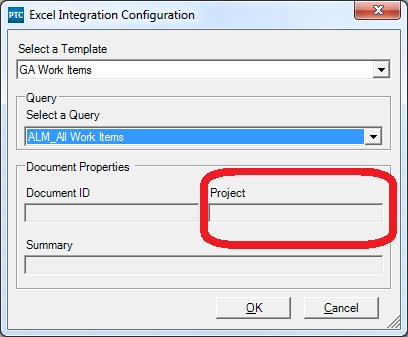
I want to create a mapping configuration for the Excel integration that will give me all of the work items in a project. I want to be able to specify the project in the dialog in Excel.
excelDialog.jpg

How do I go about doing this? I can't figure out how to enable that Project field.
    Best answer by MichaelChatel

    Nolin,

    Sorry, I was not clear on my last response, as I thought it was answered in your prior thread about this, from Matt.

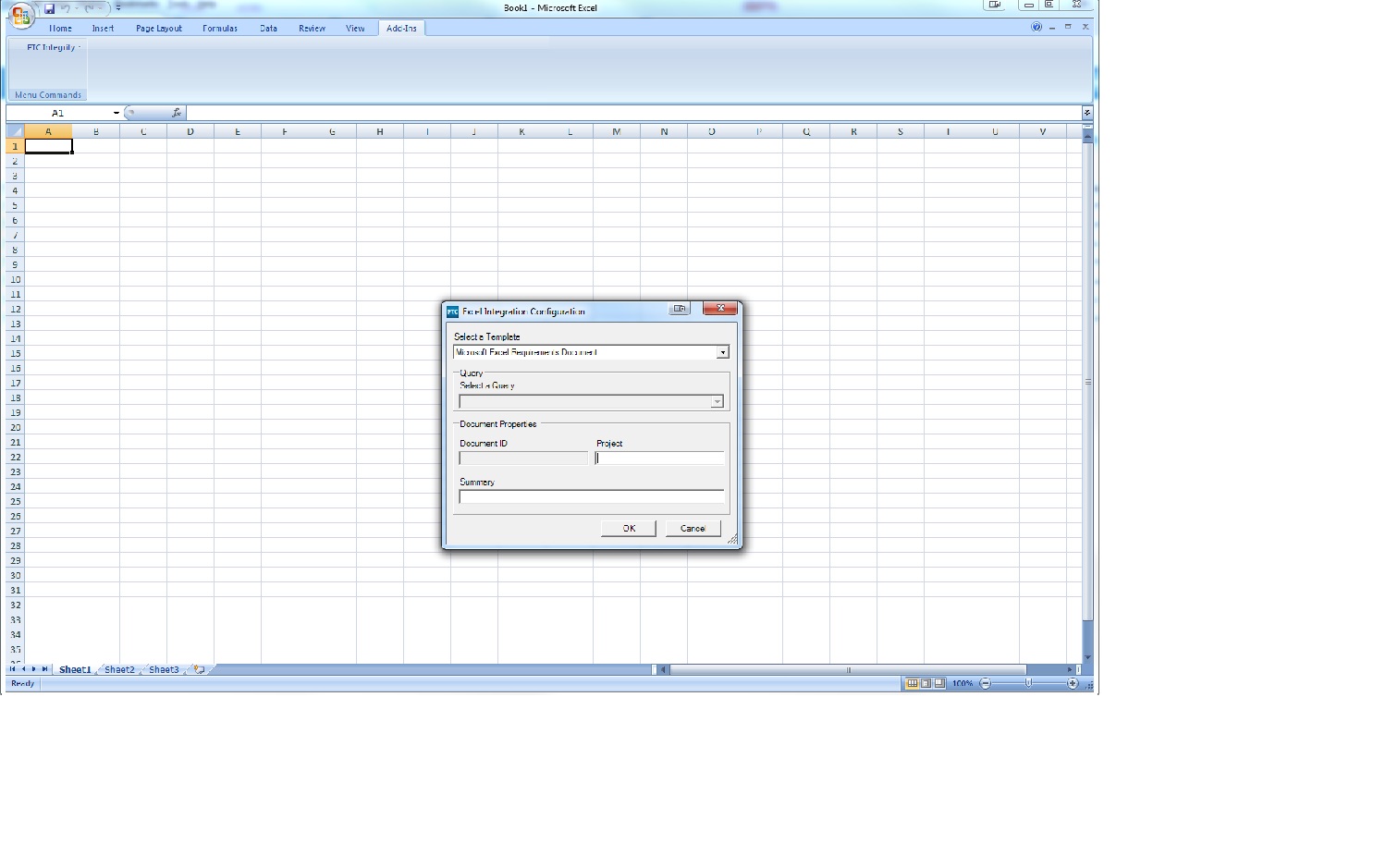
    That entry box is greyed out, because you're using a query, and the current design assumes you will specify in your query, which project(s) to query against.

    The box does become active for data entry, if you are invoking this dialog through another means, where you aren't using a query, but creating a new list, for example.  (see my attached screenshot below)

    Excel_screenshot.jpg

    1 reply

    5-Regular Member
    August 11, 2015

    Hi Nolin,

    It looks like this came up for you before, in a past inquiry here:

    Project Selection in MS Excel Integration

    As Matt mentioned, this is controlled through the mapping template, etc.

    1-Visitor
    August 11, 2015

    But how do I define it in the mapping template?

    Below is what I have so far. Also, the server doesn't seem to be willing to use the updated file. It's still using an older version that I uploaded last night.

    <?xml version="1.0" ?>
    <mapping name="GA Work Items" template-version="2.1">

      <link-field external="Item_ID"
                  data-type="integer"
                  field-type="id" />
     
      <field external="Type"
             internal="Type"
             data-type="string"
             field-type="type"
             on-create-only="true">
          <default>ALM_Work Item</default>
      </field>
     
      <field external="Project"
         internal="Project"
         data-type="string">
        <default>/ST&Q/Sandbox/nolin</default>
      </field>
     
      <field external="State"
             internal="State"
             data-type="string">
        <default>Proposed</default>
      </field>
     
      <field external="Summary"
             internal="Summary"
             data-type="string">
       <default>Created in Excel</default>
      </field>
     
      <field external="Comments"
             internal="ALM_Additional Comments"
             data-type="string" />
     
      <field external="Assigned_User"
             internal="Assigned User"
             data-type="string" />
      
      <field external="Stakeholders"
             internal="ALM_Stakeholders"
             data-type="string" />
     
      <field external="Planned_Start"
             internal="ALM_Planned Start Date"
             data-type="string" />
      
      <field external="Planned_End"
             internal="ALM_Planned End Date"
             data-type="string" />

    </mapping>

    5-Regular Member
    August 11, 2015

    Nolin,

    Sorry, I was not clear on my last response, as I thought it was answered in your prior thread about this, from Matt.

    That entry box is greyed out, because you're using a query, and the current design assumes you will specify in your query, which project(s) to query against.

    The box does become active for data entry, if you are invoking this dialog through another means, where you aren't using a query, but creating a new list, for example.  (see my attached screenshot below)

    Excel_screenshot.jpg