
12-Amethyst
January 29, 2024
Solved

How to get correct DocumentID right after Requirement creation in a trigger?
  • January 29, 2024
  • 1 reply
  • 2594 views

Hello team,

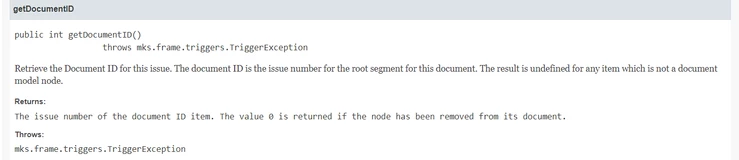
How to get correct DocumentID right after Requirement creation in a trigger?


001.png


very simple code returns 0


theRequirementDocumentID = delta.getDocumentID();
print("*** Requirement Document ID for " + delta.getType() + " " + delta.getID() + " is: " + delta.getDocumentID());

After second Text edit it goes ok though.

But I need to get DocID right after Requirement creation.

Problem in trigger Rule definition?

Now set as Type = New [Requirement]

Many thanks,


Best answer by Karol_Arorian
Hi @AN_10548594 ,

There is possibility to modify item in post trigger by using CLI commands instead of trigger API.
It's not very sophisticated and recommended and you need to be careful with that but sometimes there is no other way to achieve the goal.
Here is an example of command execution in script, you can find more options in the documentation.


var apiSession = environmentBean.createAPISessionBean();
var runner = apiSession.createAPICommandRunnerBean();
runner.setCommand("im", "<command>");
runner.execute();


Using "Document ID" field with versioning is quite risky as it could be not available for versioned item (usually it's there only for live items).

1 reply

12-Amethyst
January 31, 2024

Hi @AN_10548594,


"Document ID" field is being calculated after creation of an item.

Try to execute your logic in a "Post" trigger which will run after your new requirement is saved to DB.

12-Amethyst
January 31, 2024

Hi pal,

Thanks for help!

I can't use post trigger as i'm going to modify my requirement.

I'm trying to set computed upstream and downstream object names in custom fields to make them look nicer in Excel.

Anyway in my case the solution could be the fact that a computed number should have a version number as a postfix. That means to make it all work user should hit F3 on content to create a mior or major version. After that all triggers are ok to run.

Regards,


12-Amethyst
February 1, 2024
Hi @AN_10548594 ,

There is possibility to modify item in post trigger by using CLI commands instead of trigger API.
It's not very sophisticated and recommended and you need to be careful with that but sometimes there is no other way to achieve the goal.
Here is an example of command execution in script, you can find more options in the documentation.


var apiSession = environmentBean.createAPISessionBean();
var runner = apiSession.createAPICommandRunnerBean();
runner.setCommand("im", "<command>");
runner.execute();


Using "Document ID" field with versioning is quite risky as it could be not available for versioned item (usually it's there only for live items).