1-Visitor
March 22, 2017
Solved

How to use HistoricFieldValue in Javascript in a report?

  • March 22, 2017
  • 3 replies
  • 2193 views

Hello,


I want to get an item's content of a specified date by using HistoricFieldValue.


The general definition of HistoricFieldValue is as follows: HistoricFieldValue(field-name, timestampconstant)


In my js script I'm trying to use it in this manner:


<%compute%>HistoricFieldValue("Content","March 21, 2017")<%endcompute%>


Normally it should work , but I think the problem is the date. What is a timestampconstant?

This Error message pops up
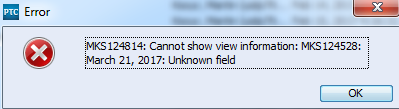
1.PNG

When i change it to


<%compute%>HistoricFieldValue("Content","Modified Date")<%endcompute%>


(This usage is senseless actually, but I want to describe the problem more precisely )


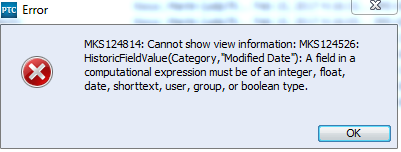
This error message occurs:

2.PNG


I hope somebody could help me how to use this HistoricFieldValue Function


Best regards

Martin

Best answer by MichaelChatel

Hi Martin,

You may want to open a Support case for assistance with this, but try the following format for timestamp-constant:

MMM d, YYYY HH:MM:SS [e.g. timestamp("Jul 25, 2014 6:18:36")]

3 replies

5-Regular Member
March 22, 2017

Hi Martin,

You may want to open a Support case for assistance with this, but try the following format for timestamp-constant:

MMM d, YYYY HH:MM:SS [e.g. timestamp("Jul 25, 2014 6:18:36")]

mkocur1-VisitorAuthor
1-Visitor
March 23, 2017

Hi Michael,

yes, this is it.

timestamp("Jul 25, 2014 01:00:00 PM")

THX for your help, i really appreciate it.

16-Pearl
March 24, 2017

Hi Martin,

maybe you are interest in this approach as well

see plot any trend chart in report