

Question
Inserting OLE Object into Rich Text results in broken preview (NullpointerException)
Hi,
I am having the following issue:
When trying to insert an OLE Object like a Visio file or an Excel file my computer fails to generate a preview thumbnail. This works on other machines.
The result looks like this:
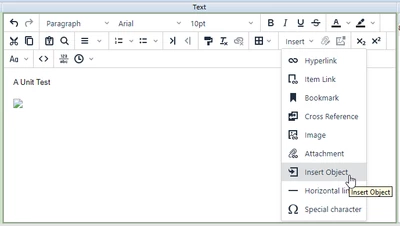
As you can see, after Inserting via "Insert -> Insert Object" only a broken Image Icon appears.
The RV&S client logs show the following:
2023-09-25 07:29:07,442 INFO [mks.IntegrityClient] (AWT-EventQueue-0) GENERAL(5): getSolutionPropertiesStartingWith Editability.: {Document.1=Project,Shared Attachments,Shared Text,Shared Category,Contains,Summary,Changes Authorized By,Subject,Doc-ID, 1=Project,Shared Attachments,Shared Text,Shared Category,Contains,Summary, Document.3=Spawns}
2023-09-25 07:29:37,084 INFO [mks.IntegrityClient] (PrivateActionProcessor-richtextfield.thread.id@item.id=84116@field.name=Text(id=429)#) GENERAL(0) java.lang.NullPointerException: java.lang.NullPointerException
at mks.ole.viewer.ProgIDs.registryLookup(ProgIDs.java:374)
at mks.ole.viewer.ProgIDs.getVisioVersion(ProgIDs.java:338)
at mks.ole.viewer.OleThumbnailGenerator.thumbnailADocument(OleThumbnailGenerator.java:190)
at mks.ole.viewer.OleThumbnailGenerator.generateThumbnailForFile(OleThumbnailGenerator.java:131)
at mks.ic.ci.ui.swing.OleThumbnailDialog$GenerateThumbnail.doModelAction(OleThumbnailDialog.java:88)
at mks.frame.app.ui.swing.ActionProcessor.perform(ActionProcessor.java:422)
at mks.frame.app.ui.swing.ActionProcessor$Dequeuer.run(ActionProcessor.java:747)
at java.base/java.lang.Thread.run(Thread.java:829)

2023-09-25 07:29:37,124 INFO [mks.IntegrityClient] (PrivateActionProcessor-richtextfield.thread.id@item.id=84116@field.name=Text(id=429)#) GENERAL(0) java.lang.NullPointerException: java.lang.NullPointerException
at java.desktop/javax.swing.ImageIcon.<init>(ImageIcon.java:240)
at mks.ic.ci.ui.swing.richcontent.TinyMCE$InsertContentAndImageSizeProviderImpl.getWidthAndHeight(TinyMCE.java:2940)
at mks.ic.ci.views.documentview.ImgTagDimensionChanger$Action.doNonUIAction(ImgTagDimensionChanger.java:72)
at mks.ic.ci.ui.swing.richcontent.TinyMCE$InsertContentAndImageSizeProviderImpl$1.doModelAction(TinyMCE.java:2977)
at mks.frame.app.ui.swing.ActionProcessor.perform(ActionProcessor.java:422)
at mks.frame.app.ui.swing.ActionProcessor$Dequeuer.run(ActionProcessor.java:747)
at java.base/java.lang.Thread.run(Thread.java:829)
Any help would be appreciated.
Thank you!