

1-Visitor
November 8, 2012
Solved

Integrity Solution Installation

  • November 8, 2012
  • 1 reply
  • 1646 views

when i Install sample data,the error display:the integration between source and integrity must be enabled to install the sample data.

how do i sovle it?

    Best answer by jgorsline

    Guang,

    This is just a small configuration step you need to take. In the Integrity Admin Client, in the Configuration Management node, click on Policies, and then right click on Global Policies and select Edit. On the Change Packages tab, put a check next to "Integrity Manager Enabled". Apply and restart your client for this to take effect. Once you have done this, the sample data/solution should install without a problem.

    See the picture below:
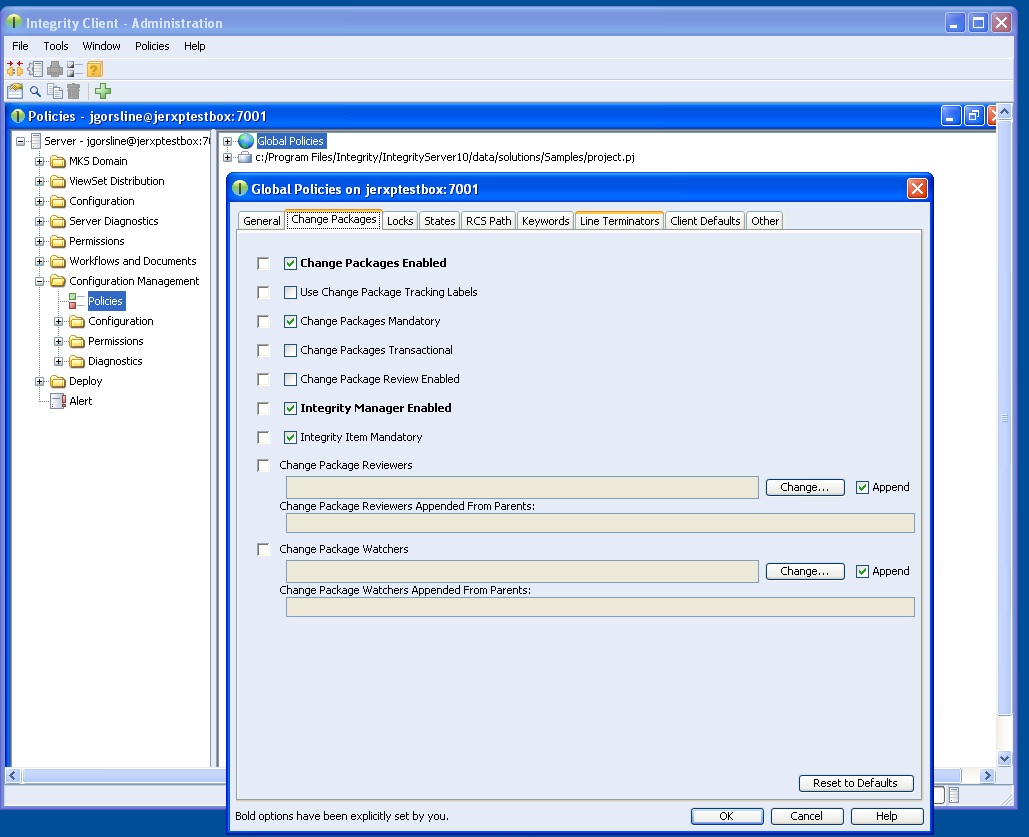
    Manager_enabled.jpg

    1 reply

    jgorsline1-VisitorAnswer
    1-Visitor
    November 8, 2012

    Guang,

    This is just a small configuration step you need to take. In the Integrity Admin Client, in the Configuration Management node, click on Policies, and then right click on Global Policies and select Edit. On the Change Packages tab, put a check next to "Integrity Manager Enabled". Apply and restart your client for this to take effect. Once you have done this, the sample data/solution should install without a problem.

    See the picture below:

    Manager_enabled.jpg