1-Visitor
March 25, 2021
Solved

Malformed\uxxxx encoding

  • March 25, 2021
  • 3 replies
  • 6670 views

Hello everyone,

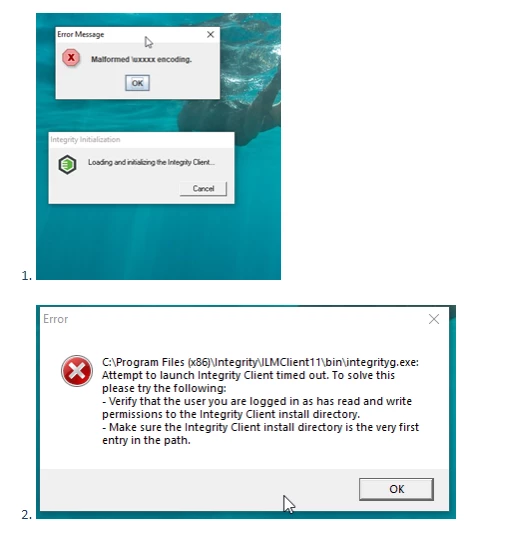
I am facing an issue with PTC integrity. Whenever I start the PTC, I get the following errors.


'Malformed\uxxxx encoding'

PTC_Issue.png


Afterwards PTC integrity never opens. Could you please help me in resolving this?

Even reinstalling the PTC integrity by company's IT team did not help.


Thanks,

Shanmu

Best answer by kjain2

Hi @Shanmu ,


Before i go into the detail or make any guess i would suggest you to mainly check couple of things:-


1./ Ensure your Environment variable is set mainly %PATH% &%MKS_IC_INSTANCE_DIR%

2./ Make sure you have read and write access to directory where %MKS_IC_INSTANCE_DIR% is pointed to otherwise choose an directory where you have an access.

3./ Close the Integrity client if running, please also check from Task Manager to be sure that it's not even running in background. Then backup and delete the following files/folders from %HOME%.mksIntegrityClient.rcICServicePack (Note: Client preferences, viewsets and sandboxes will be temporarily gone with this test if you have any) and restart the client.


And this is very good article to follow as already suggested :-

Article - CS123559 - Integrity Lifecycle Manager Client will not start on Windows (ptc.com)


Does this help?


Vielen Dank / Many Thanks,

Kapil Jain

3 replies

5-Regular Member
March 25, 2021

This knowledge article goes through the usual troubleshooting steps, to resolve this Integrity client start/timeout issue:


https://www.ptc.com/en/support/article/CS123559


FYI, you probably want to post/ask, in this sub-forum instead,

https://community.ptc.com/t5/Windchill-Systems-Software/bd-p/Integrity


As that one is for Windchill RV&S (Integrity).


Mike


5-Regular Member
March 25, 2021

I've asked the forum moderator, if this thread can be moved to:

https://community.ptc.com/t5/Windchill-Systems-Software/bd-p/Integrity


kjain214-AlexandriteAnswer
14-Alexandrite
April 23, 2021

Hi @Shanmu ,


Before i go into the detail or make any guess i would suggest you to mainly check couple of things:-


1./ Ensure your Environment variable is set mainly %PATH% &%MKS_IC_INSTANCE_DIR%

2./ Make sure you have read and write access to directory where %MKS_IC_INSTANCE_DIR% is pointed to otherwise choose an directory where you have an access.

3./ Close the Integrity client if running, please also check from Task Manager to be sure that it's not even running in background. Then backup and delete the following files/folders from %HOME%.mksIntegrityClient.rcICServicePack (Note: Client preferences, viewsets and sandboxes will be temporarily gone with this test if you have any) and restart the client.


And this is very good article to follow as already suggested :-

Article - CS123559 - Integrity Lifecycle Manager Client will not start on Windows (ptc.com)


Does this help?


Vielen Dank / Many Thanks,

Kapil Jain

12-Amethyst
May 2, 2023

Just to add, Issue was resolved by removing only IntegrityClient.rc file for one of my user.
Rather than reinstallation, if anyone facing the issue, just try this solution.

4-Participant
January 23, 2025

This worked perfectly. Thanks a lot.