

16-Pearl
August 5, 2013
Question

plot any trend chart in report

  • August 5, 2013
  • 4 replies
  • 4591 views

Hi all,

I finally found a way to plot e.g historical trend charts on almost any numeric item field inside a report.

It uses the open source JS libraries jquery and http://www.jqplot.com/.

All you need to do is download the files an place the on your integrity server (or anywhere else in your network)

The recipe attached uses <integrity server installdir>\data\public_html\JS\jquery as installation point for jquery, and

<integrity server installdir>\data\public_html\JS\jquery\jqplot for the jqplot plugin.

Feel free to change the location according to you needs.

The report recipy attached use the given computed expressions of IM to fetch the historical data into a html table, and a bit of JavaScript magic in the browser does the rest.
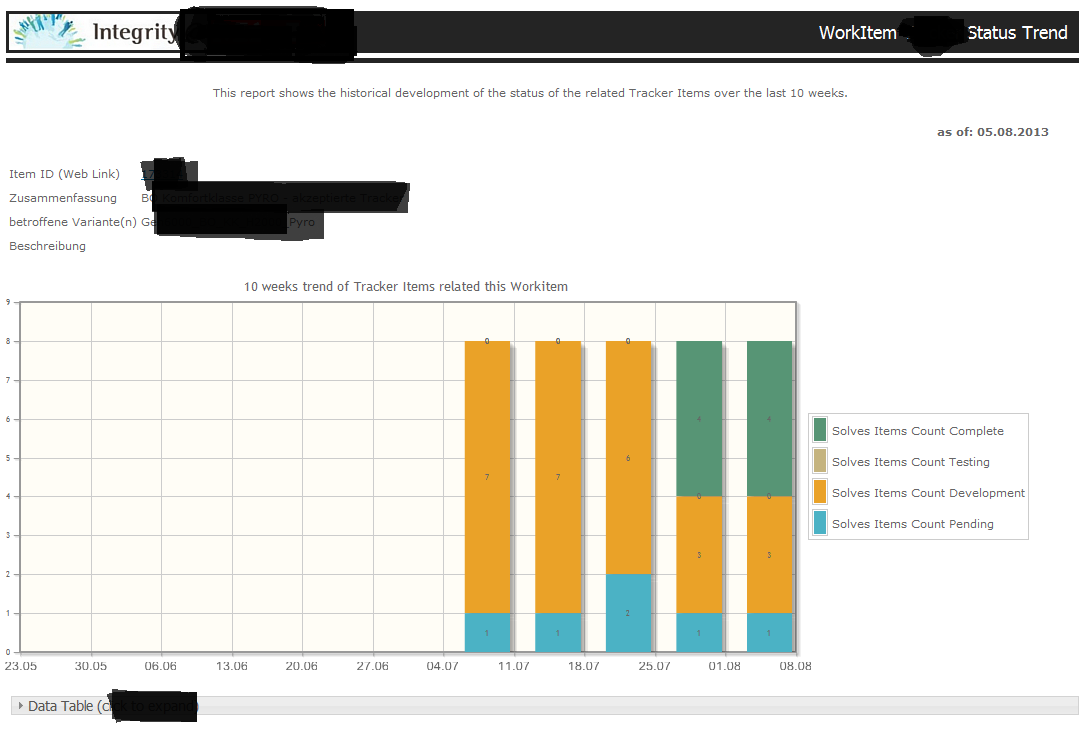
Unbenannt.PNG

Hope you enjoy it, and feel free to post screenshots of your own reports.

I'm curious about our results

    4 replies

    16-Pearl
    August 7, 2013

    Thanks, Matthias!

    This looks really cool. When I have some free time I'll try it out!

    Regards,

    Kael

    mrump16-PearlAuthor
    16-Pearl
    February 27, 2015

    Note: some users noticed problems in the browser support for "jqplot":

    • In IE8+ all works fine.
    • In CHROME the time axis for the chart is set to one year, and thereby distorts the plotted graph.

    I plan to post an updated version using maybe "googlecharts".

    1-Visitor
    May 22, 2017

    Hi Mr. Rump,

    It's is looking quite interesting because i already worked on Jquery for  Charts and Graphs but it is little different . I will implement this and get back to you.

    Thanks for this information.

    Regards

    Kapil Jain

    1-Visitor
    September 14, 2017

    Hi @mrump,


    I have all the jquery files for plotting this Trend Chart....
    But can you send me some screenshots of Reports or Data you are extracting from Integrity if it's not confidential so i can get some idea and better understanding about your recipe...

    I look forward to hear from you.


    Regards,

    Kapil

    mrump16-PearlAuthor
    16-Pearl
    September 14, 2017

    here's a sample report, using the recipe from above