1-Visitor
April 30, 2015
Solved

Project Selection in MS Excel Integration

  • April 30, 2015
  • 1 reply
  • 1616 views

How do I make the project field selectable in the Excel integration?
excelIntegration.png

    Best answer by mrump

    IMHO it works as follows:

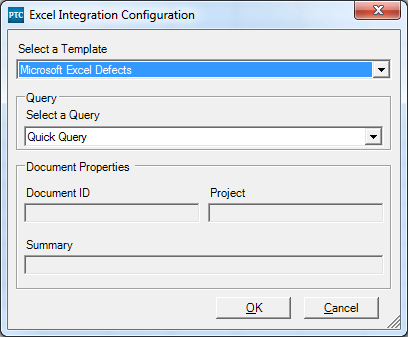
    1. you define / selct the mapping template , e.g. "Microsoft Excel Defects".

    The template defines whether you word with items based on a query, or Content based on document ID, summary and Project.

    2. your template is set to items based on query and you select a query, e.g "quick query".

    In your query definition you can define the project to work in and you can add the project field to the default columns.

    The Excel Integration can only utilize the mapping and the querie you previviously defined.

    1 reply

    mrump16-PearlAnswer
    16-Pearl
    May 4, 2015

    IMHO it works as follows:

    1. you define / selct the mapping template , e.g. "Microsoft Excel Defects".

    The template defines whether you word with items based on a query, or Content based on document ID, summary and Project.

    2. your template is set to items based on query and you select a query, e.g "quick query".

    In your query definition you can define the project to work in and you can add the project field to the default columns.

    The Excel Integration can only utilize the mapping and the querie you previviously defined.
