1-Visitor
February 23, 2017
Solved

Reordering Packages?

  • February 23, 2017
  • 1 reply
  • 3233 views

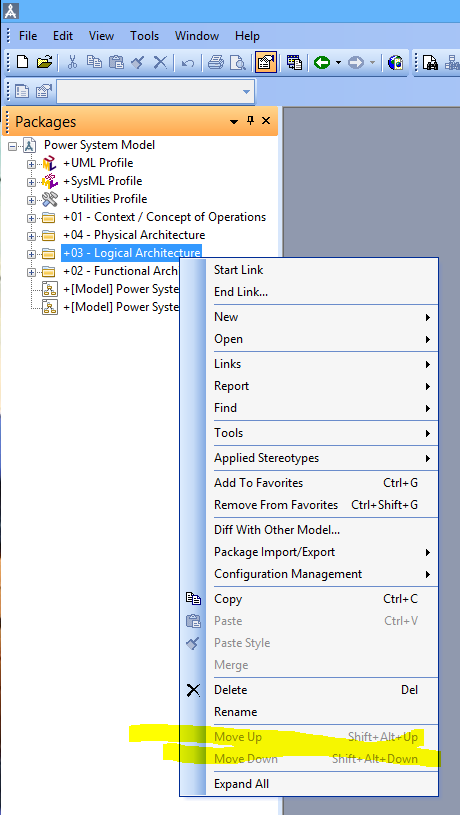
How may I reorder packages in the Package Browser?  I'm able to do it easily with its contents (Shift+Alt+up/down), but the option is grayed-out at the Packages level:

(I'd like to put them in 01, 02, 03, 04 order)
packageOrder.PNG

    Best answer by PatrickOllerton

    Hi Chris,

    Here's how to set the order of packages:

    1. De-select the "Show Package Items Sorted" option from the View menu.
    2. Select the package you want to organise items in
    3. Select the Items tab and choose "All Package Items" from the drop down
    4. You can select the items and use the arrows to move items up/down or to the top/bottom
    5. This also works at the root level of a model (choose Packages from the drop down on the Items tab) with some restrictions as Profile packages can't be re-ordered, but it should work for your package structure above.

    regards,

    Patrick

    1 reply

    16-Pearl
    February 23, 2017

    hi Chris,

    There is an option under the View menu to sort packages:

    package_sorting.jpg

    Hopefully this provides what you need.

    regards,

    Patrick

    cfreund1-VisitorAuthor
    1-Visitor
    February 23, 2017

    Patrick,

    I toggled between all those options, and they had no effect.  What is the sorting criteria? Date of creation?  Whatever it is, it's neither alphabetical nor numerical.

    I'm using 8.3.18 by the way.  Patches 8.3a and 8.3b are also installed.

    16-Pearl
    February 23, 2017

    hi Chris,

    You only need to toggle the "Show Package Items Sorted" option.

    That's strange, it works for me - see images below. If sorting doesn't work for you, I suggest you create a Support call so they can help resolve the problem.

    Here are my packages with the "Show Package Items Sorted" option de-selected:

    unsorted_packages.jpg

    Here they are with the option selected:

    sorted_packages.jpg

    There is also a way to explicitly define the order of items - I'll add that in another reply.

    regards,

    Patrick

    Update: Support tell me that sorting does not work as expected at the root of the model - hence the problem you are seeing. We already have this issue captured in our database.