1-Visitor
April 22, 2015
Solved

Sandbox browse dialog missing the up/new/list/details icons

  • April 22, 2015
  • 1 reply
  • 1395 views

When I create a sandbox, the browse dialog box is missing the up/new/list/details icons in the upper right corner. I think it might be related to comdlg32. Anyone know how to get these icons back?


MKS Integrity Client 2009

Build 4.10.0.9049

Service Pack: 006-01
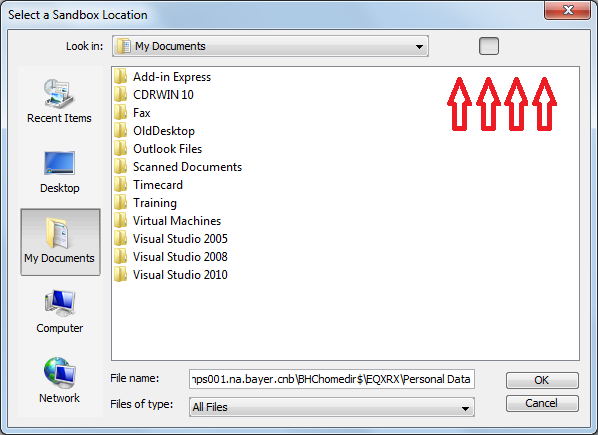

MKS-MissingIcon.png

Thanks

/jeff

    Best answer by JoeBartlett

    Hi Jeff,

    This was a problem with JFileChooser in Java 6 (the version shipped with the Integrity 2009 releases) and Windows versions with the Aero theme (Vista and later). This was fixed in later versions when we updated the JRE shipped with Integrity 10.5 to Java 7. Until you upgrade, you will see this with the file chooser dialogs but the buttons themselves still work - you just can't see the icons.

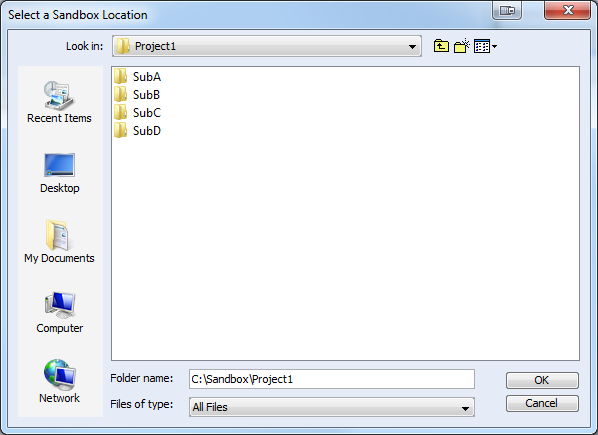
    For convenience, here is a screenshot of the icons in their order:

    Up One Level, New Folder, View Menu

    FileChooserWindow.png

    1 reply

    21-Topaz I
    April 23, 2015

    Hi Jeff,

    This was a problem with JFileChooser in Java 6 (the version shipped with the Integrity 2009 releases) and Windows versions with the Aero theme (Vista and later). This was fixed in later versions when we updated the JRE shipped with Integrity 10.5 to Java 7. Until you upgrade, you will see this with the file chooser dialogs but the buttons themselves still work - you just can't see the icons.

    For convenience, here is a screenshot of the icons in their order:

    Up One Level, New Folder, View Menu

    FileChooserWindow.png

    jpilant1-VisitorAuthor
    1-Visitor
    April 23, 2015