1-Visitor
March 24, 2015
Solved

Test Result Modified Date

  • March 24, 2015
  • 3 replies
  • 4438 views

How do I access the "Test Result Modified Date" value from a trigger? The value I'm referring to is in the below image.
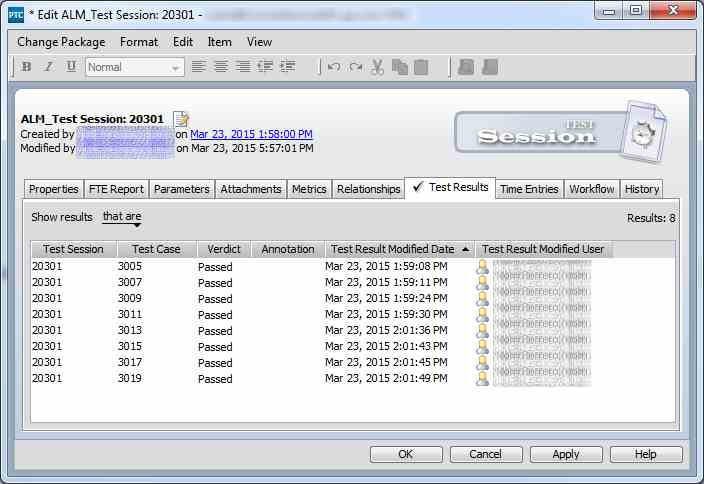

 

TestSession.jpg

Best answer by nborrerojr.

Just closing this out...

Capability doesn't appear to exist yet. See below.

Case: https://support.ptc.com/apps/case_logger_viewer/auth/ssl/case=12476217

https://support.ptc.com/appserver/cs/view/solution.jsp?n=CS165104&source=Case%20Viewer

3 replies

1-Visitor
March 31, 2015

I still haven't been able to figure this out. Is this possible?

16-Pearl
April 1, 2015

Hi Nolin,

I would try to use the ScriptTestResultBean 's method

public java.lang.Object getFieldValue(java.lang.String fieldName)

so in a script something like:

....

// get the server

var serverBean = bsf.lookupBean("imServerBean");

// some Helpers

var aSimpleDateFormat= params.getParameter("dateFormat Field");

var formater = new java.text.SimpleDateFormat(aSimpleDateFormat);

// get your testsession by issueID

var sessionBean = serverBean.getIssueDeltaBean(issuesID);

// get your test results array

var allresultsArray = sessionBean.getRelatedTestResultBeans();


// get Modified Date of the first test result

if (allresultsArray[0] != null){

var modDate = allresultsArray[0].getFieldValue ("Test Result Modified Date");

if (modDate != null){

if (modDate instanceof java.util.Date ){

Packages.mks.util.Logger.message("GENERAL", 0, " First Result modified on : " + formater.format(modDate ));

}

}

}


HTH Matthias

1-Visitor
April 1, 2015

I get Not Found when I try to use Test Result Modified Date. The trigger runs when the Test Session is moved to the ALM_Completed state.

var delta = bsf.lookupBean("imIssueDeltaBean");

var resBean = delta.getAssociatedSessionTestResultBeans();

resBean[i].getFieldValue("Test Result Modified Date"); // This is used in a loop in the trigger

I just tried using delta.getRelatedTestResultBeans() as well but it gives the same result of Not Found.

errorMessage.jpg

nborrerojr.1-VisitorAuthorAnswer
1-Visitor
June 11, 2015
1-Visitor
June 24, 2015

Here is how I get around it...by using the API.  I'd rather not have to go to the API to get something that should be available in the BSF, but you have to do what you have to do.

// Main

function main()

{

  API.Session   = eb.createAPISessionBean();

  API.CmdRunner = API.Session.createAPICommandRunnerBean();

  var resultObject = getTestResultModifiedDate(put sessionId here, put testId here);

}

function getTestResultModifiedDate(sessionId, testId)

{

  var args =

  [

  [ "tm"           , "results"      ],

  [ "sessionID"    , sessionId      ],

  [ "fields"       , "modifiedDate" ],

  [ "selection"    , testId         ]

  ];

  var response = API.execute(args);

  var results  = {};

  // Generate return object, in this case there is just one result (workItem)

  // So the loop is a bit overkill

  var workItems = response.getWorkItems();

  while (workItems.hasNext())

  {

  var workItem = workItems.next();

  var results.modifiedDate = java.util.Calendar.getInstance();

  results.modifiedDate.setTime(java.util.Date(workItem.getField(resultFld).getDateTime()));

  }

  return results;

}

// API

//*********************************************************************************

var API =

{

  Session   : false,

  CmdRunner : false,

  execute : function (args)

  {

  var cmdName = "";

  var total   = args.length;

  API.CmdRunner.resetOptions();

  API.CmdRunner.resetSelection();

  for (var i = 0; i < total; i += 1)

  {

  print("args[" + i + "]: " + args[i]);

  if (i === 0)

  {

  cmdName = args[i][1];

  API.CmdRunner.setCommand(args[i][0], cmdName);

  }

  else if (String(args[i][0]) === "selection")

  {

  API.CmdRunner.addSelectionElement(args[i][1]);

  }

  else if (args[i].length == 1)

  {

  API.CmdRunner.addOption(args[i][0]);

  }

  else if (args[i].length == 2)

  {

  API.CmdRunner.addOption(args[i][0], args[i][1]);

  }

  }

  // Invoke the command through the API using the default API credentials from is.properties

  var response = null;

  var exitcode = 0;

  try

  {

  response = API.CmdRunner.execute();

  exitcode = response.getExitCode();

  if (exitcode != 0)

  abort("The " + cmdName + " command failed with exit code: " + exitcode);

  }

  catch (re)

  {

  var errtxt = "Exception thrown while executing " + cmdName + " command.  Exception message: " + re.message;

  abort(errtxt);

  }

  return response;

  }

};

main();

1-Visitor
June 24, 2015

I forget to include the environmentBean!

var eb            = bsf.lookupBean('siEnvironmentBean');

1-Visitor
June 24, 2015

That is a great solution. Thank you for sharing!