

tbraxton
22-Sapphire II
22-Sapphire II
March 24, 2021
Question

Adding features to layers in part mode using manual selection; focus issue in layers dialogue box

  • March 24, 2021
  • 3 replies
  • 4045 views

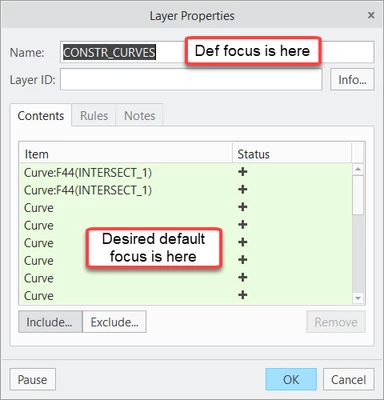
Is anyone aware of how to change the default focus of the layer properties dialogue box? The workflow is more complex than what I am laying out below but this is the essence of an impediment to implementation. This is another example of where it would be great if the UI customization could be controlled in creo_parametric_customization.ui file but I do not see way way to implement it.

A mapkey may be possible to shift focus but I would like to control it with config setting. If I were to use a mapkey it would be nested sequence to invoke the layer dialogue box.


Use case of interest.

Manual selection of features from the model tree or graphics window in part mode

1) Activate the layer tree and choose a layer and select properties from RMB

2) User interaction is required to shift the focus to the layer contents tab

3) Manually select items to add to layer


I want to be able to set the default focus to the contents tab not the layer name but the contents tab to enable immediate mouse selection of features directly..
 

tbraxton_0-1616614642539.png


3 replies

19-Tanzanite
March 24, 2021

Well, I don't know of a config option.  but maybe you can use this mapkey which is activated after selecting a layer and it will open the layer list and have it focused like you wanted...

mapkey ee @MAPKEY_LABELAccess Object's Properties (ee);\
~ Command `ProCmdSketEditProperties@PopupMenuGraphicWinStack`;\
~ Command `ProCmdLayer_LayProps` ;\
~ FocusOut `newlayerprops` `LayerNameInput`;\
~ Select `newlayerprops` `LayContentsPH.ItemRefList` 0;\
~ Command `ProCmdSketExplain`;\
~ Command `ProCmdEditProperties`;

(I use the same mapkey to edit properties of objects other than layers - anyway, I think it's lines 3-6 that you can use in your case)


kdirth
21-Topaz I
21-Topaz I
March 25, 2021

What version of Creo are you using.  I am using 4.0 M130, and I do not need to change the focus to add to the layer.  I open the properties and start selecting entities from the Model Tree or on screen.  The highlight is removed from the layer name and the entity is added to the contents with the first selection.  This is how it has always worked for me.

There is always more to learn.
kdirth
21-Topaz I
21-Topaz I
March 25, 2021

Judging by the colors on the image supplied, Content list green, the contents are the focus when the properties are opened.

There is always more to learn.
tbraxton
22-Sapphire II
tbraxton22-Sapphire IIAuthor
22-Sapphire II
April 9, 2021

PTC has provided an explanation of intended behavior of the layer properties dialogue box. There are two active input fields when the DB is invoked, input from the keyboard and the mouse are valid.

The Layer Properties window has a green field because the selection ability IS active when the window is opened. If you select Layer Properties, you can immediately select an eligible item and it will add to the collector.
The Name field IS ALSO active and an eligible entry will populate this field.
• Open Layer Properties and select a datum plane in the graphics window and it will add to the selection
• Open Layer Properties and start typing and the name will change