1-Visitor
July 13, 2017
Solved

BOM table that only shows items in a simplified rep

  • July 13, 2017
  • 2 replies
  • 4501 views

I am trying to create a drawing template that uses a simplified rep for a view and a bom table that

only shows the items shown in the simplified rep.  My template uses the simplified rep but the BOM table

still shows all the items and qty's in the entire assembly.  Any suggestions on how to acheive this?


Thanks,

Brian



Best answer by Chris3

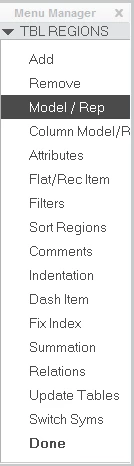
You need to change the table to use the simp rep that you want. Click on the table tab and then the repeat region button. Then click the model / rep menu and choose your table. Then pick the assembly again only pick the simp rep you want when it prompts you.


Capture.PNG

2 replies

Chris3
Chris321-Topaz IAnswer
21-Topaz I
July 14, 2017

You need to change the table to use the simp rep that you want. Click on the table tab and then the repeat region button. Then click the model / rep menu and choose your table. Then pick the assembly again only pick the simp rep you want when it prompts you.


Capture.PNG

bjoyner1-VisitorAuthor
1-Visitor
July 14, 2017

Thanks for the response. 

Works great. 

Very simple once you know how to do it.

Brian

1-Visitor
October 19, 2022

IM KINDA NEW TO THIS. I AM TRYING TO GET A BOM FROM A SIMPLIFIED REP OF THE MAIN ASSY, NOT IN A DRAWING, I CANNOT FIND THE MENU MANAGER TAB YOU ARE SHOWING, HOW DO I GET THERE, OR WILL BOM NOT WORK IN ASSY MODE?

THANKS.

23-Emerald III
October 19, 2022

That menu is for drawing tables. It will not be found in an assy.

You can get a BOM on an assembly from the Model tab, Bill of Materials icon


StephenW_0-1666189797319.png