
1-Visitor
November 25, 2016
Question

How can I change font size for tolerance?

  • November 25, 2016
  • 1 reply
  • 3066 views

How can I change font size for tolerance in drawing? In the same drawing I have two different font sizes and I don't know how to fix it.


P.S. Drawing and model were made in Wildfire 4 or 5, but now I have Creo 3.
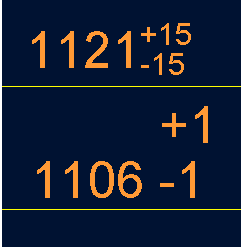
1.png


This thread is inactive and closed by the PTC Community Management Team. If you would like to provide a reply and re-open this thread, please notify the moderator and reference the thread. You may also use "Start a topic" button to ask a new question. Please be sure to include what version of the PTC product you are using so another community member knowledgeable about your version may be able to assist.

1 reply

24-Ruby III
November 25, 2016

Hi,

your situation is strange. I always thought, that tolerance display cannot be set individually.

Tolerance display is driven by following drawing configuration options, their default value is STANDARD

tol_text_height_factor

tol_text_width_factor

Suggestion: Update drawing using commands from Review tab.

MH

1-Visitor
December 7, 2016

Hi, sorry for late response, but I'm very busy and this problem is the smalest from what I have.

I tried to regenerate, update sheets, draft, dawing view, tables, but it's not working.

Tolerance display I have set on standard value.

Any suggestions?

24-Ruby III
December 7, 2016

Sorry, no other ideas.

MH