5-Regular Member
February 6, 2023
Solved

How to create a subassembly.

  • February 6, 2023
  • 1 reply
  • 3061 views

How can i create a sub assembly from an existing assembly. That i can use on another assembly.

Best answer by Chris3

@tbraxton has the right answer here but to expand on the answer:


1. If you don't have access to skeleton models you can use just an empty part model that holds your CSYSs or just place a bunch of CSYSs at the new assemble level.


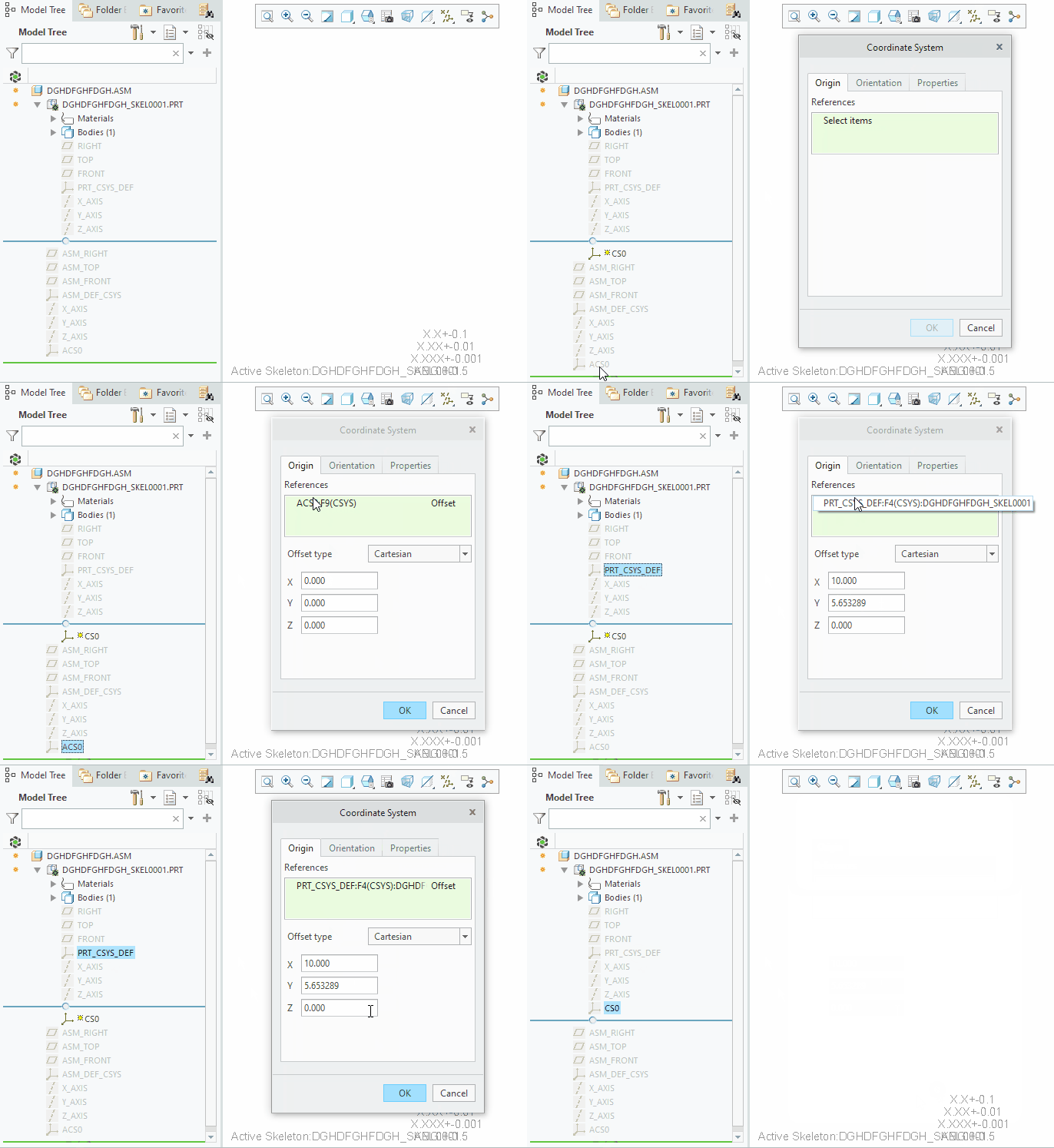
2. Once you make your new assembly and skeleton, assemble it into your existing assembly. Then activate the skeleton in your new assembly. Then create a new CSYS feature and place it on top of the electrical box default CSYSs. Before closing the dialog box click the skeleton CSYS. This will then cause Creo to copy all of the CSYS transformations into the new default CSYS without the need to make a transformation matrix measurement. After you have closed the new CSYS dialog box you can now go back into your new assembly and assemble the electrical box on the new CSYS that you made in the skeleton model.
1.gif


1 reply

tbraxton
22-Sapphire II
22-Sapphire II
February 6, 2023

Create a new assembly and then add your existing assembly to the new model. It will then be a component in the newly created assembly. If this is not the solution you need then you will need to provide additional details on your scenario.


5-Regular Member
February 6, 2023

With more added detail. I have multiple electrical boxes in place. That i would like to create a subassembly of. That i could then drop into another assembly. Just as they are already positioned.

JG_10566827_0-1675721879916.png

Thanks, JG

21-Topaz I
February 7, 2023

If you didn't change the reference to be the default CSYS of the skeleton then yes there would be an external reference. When you complete the second step of clicking the default skeleton CSYS though, you remove the external reference and change it to the local skeleton CSYS reference.

