


Making UDFs with annotation features that are independent of a annotation plane
I have a UDF that has annotation features
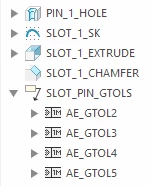
When I use this UDF in another part, if the annotation plane is different from the one that the UDF was created in then the annotations come in with the suppressed icon next to them and while you can see them briefly if you edit the dimension they are associated to they will not show up using the show annotations button.
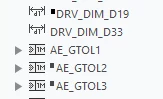
I opened up a ticket and PTCs response was that I need to place the UDF in the same annotation plane that it was originally made in. This means that I would need 6 different UDFs that all have the same features. My users would need to figure out what annotation plane they are working in and then pick the correct UDF that corresponds.
Am I missing something? Does anyone know of a work around for this? If there is none then I can open an idea, seems like PTC should be able to auto change the annotation plane to correspond to one that the UDF placement is parallel to.