
13-Aquamarine
February 10, 2024
Solved

cylinder vs slider for hydraulic actuator

  • February 10, 2024
  • 1 reply
  • 7259 views

I am having no luck in applying servomotors to mechanisms. I have done it in the past but either I Am missing some step or creo is not functioning. Using manufacturer supplied assemblies was my first thought for source of failures. so I manually redefined the piston to the cylinder. no luck. Then I made a super rudimentary piston/cylinder assy. nope. I can drag the piston and the limits work as intended in the model. However, in mechanism, I can only get a partial move then it fails with errors. 


error msg with 2 servos:  All position constraints can't be simultaneously satisfied. The following position constraints can't be satisfied:
1) Servo motor constraint for servo motor Motor 1 in model 62205K194_NO_THREADS_HYDRAULIC_ can't be satisfied.  2) Servo motor constraint for servo motor Motor 2 in model 62205K194_NO_THREADS_HYDRAULIC_ can't be satisfied.   
 

or with a single servo:

All position constraints can't be simultaneously satisfied. The following position constraints can't be satisfied:

1) Upper limit of the first translation axis in connection Connection_1 in model 62205K194_NO_THREADS_HYDRAULI_1 (component id path [5]) can't be satisfied. 

 2) Servo motor constraint for servo motor Motor 1 in model 62205K194_NO_THREADS_HYDRAULIC_ can't be satisfied.   


Best answer by pausob

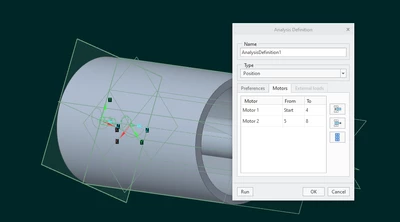
No, the parameters in that analysis definition motor tab table are the times that the motors are 'active'

And your motor is defined as 1"/sec, so after 8 seconds, the piston will travel 8"... but it can only go 5.75" due to the limits!

Probably same thing happens when the "other motor" is turned on.

BTW, I do wonder why you are using 2 motors to simulate this, instead of using a simple table to specify the motion, but anyway: for sake of diagnosing your situation: If I redefine your analysis with these values: 

pausob_0-1708458641623.png

it works fine on my end.  Does it work for you?


1 reply

Community Moderator
February 19, 2024

Hi anthonyws,

Thank you for your question. 
I’d like to recommend to bring more details and context to your initial inquiry

It also helps to have screenshot(s) to better understand what you are trying to do in your process. 

This will increase your chances to receive meaningful help from other Community members. 

Regards,

Community Moderation Team.

anthonyws13-AquamarineAuthor
13-Aquamarine
February 19, 2024


Screenshot 2024-02-19 105625.pngScreenshot 2024-02-19 105751.png

The cyl on the left is from Parker. many parts and features.  Since it was not functioning with the mechanism servomotor using cylinder assembly constraints, I tried slider constraints. This was the advice on many youtube tutorials. Apparently is is more reliable? Not sure why connecting a piston to a cylinder would have trouble using the "cylinder" constraint specifically designed for this. So after many attempts to get the motor to drive the piston out and back I decided there may be issues with the Parker model. I then made the simplified model assembly on the right and went through the process of putting the cylinder on the default constraint then adding the piston using cylinder constraint. Setting limits and testing with the drag function. All good (as before). Now I start mechanism in creo and attempt to assign motors to the cylinder assembly. The motor will drive the piston out most of the way then fail with the errors I listed above. Sometimes there was a " bobble" in the travel and sometimes it would stop part way. When  a second motor was added to derive it back in the opposite direction (home) it would not work. ever. when i set the times in the motor dialog as shown, nothing happens and the values reset to start/end for both motors. The manually entered values always revert to default. 

anthonyws_1-1708358925939.png

So this has me wondering if I missed a step. There are no meaningful warnings or suggested corrections.

anthonyws_2-1708359002525.png

I have done this many times before in creo and other software. It's not complicated. maybe there is a step that is assumed that I don't remember. I have followed creo tutorials from the learning conector as well as many top tier creo youtube channels. 

Some variations I have tried include using different references for the motion constraint. axis', piston face/cylinder blind end, rod end/cyl bore shell surface. I tried to use planes but they are unselectable. Any suggestions or ideas are most welcome, 

Cheers


15-Moonstone
February 20, 2024

Maybe try uploading your assembly? I made a quick cylinder in Creo 6 with a servo motor that drives it out and then back in. Try running the analysis in this one and see if it works for you. It works on my machine, so if it's not working on yours, something is wrong on your end. If it works on yours, try to see if there are any changes, or again, upload your own assembly so we can look at it.


Pettersson_0-1708429993958.png