
1-Visitor
August 17, 2017
Solved

how to export each sheet as separate dxf from drawing file?

  • August 17, 2017
  • 3 replies
  • 10455 views

I usually need to export dxf files. I would have a multisheet drawing file, and I would need to make a separate dxf from each sheet. Is there anyway I can do it automatically?  Any script or anything else?

I want to export multiple dxf files with one click. Also can I export dxf without border line? I just need drawing view not borders. Is there anyway to stop borders being drawn in export dxf file?
Best answer by BillChapman

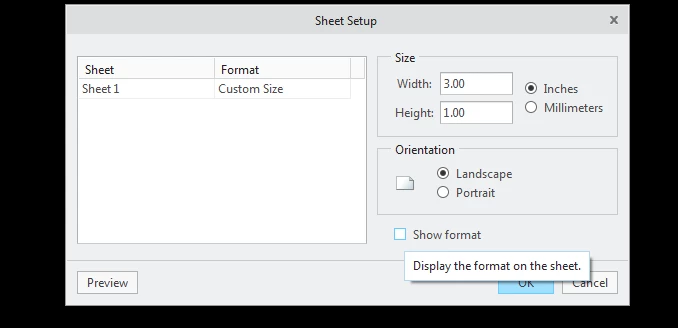
Yes but my mapkey does not do this, you will have to modify it or create a new one that does this first.  You can shut off the format with the "Show format" check box shown below.  This is found in the layout tab of the drawing.  show format.pngcheck box 


3 replies

13-Aquamarine
August 17, 2017

I do this with a mapkey.  Start on page one of the drawing and run the mapkey below


mapkey dxf @MAPKEY_NAMEOutputs mutiple sheet DXF files;@MAPKEY_LABELMDXFM;\
mapkey(continued) ~ Close `main_dlg_cur` `appl_casc`;~ Command `ProCmdModelSaveAs` ;\
mapkey(continued) ~ Open `file_saveas` `type_option`;~ Close `file_saveas` `type_option`;\
mapkey(continued) ~ Select `file_saveas` `type_option` 1 `db_137`;\
mapkey(continued) ~ Activate `file_saveas` `OK`;~ Activate `export_2d_dlg` `OK_Button`;\
mapkey(continued) ~ Activate `UI Message Dialog` `ok`;\
mapkey(continued) ~ Command `ProCmdDwgSwitchSheet` 2 ;\
mapkey(continued) ~ Command `ProCmdDwgSwitchSheet` 2 ;~ Command `ProCmdModelSaveAs` ;\
mapkey(continued) ~ Open `file_saveas` `type_option`;~ Close `file_saveas` `type_option`;\
mapkey(continued) ~ Select `file_saveas` `type_option`1 `db_137`;\
mapkey(continued) ~ Activate `file_saveas` `OK`;~ Activate `export_2d_dlg` `OK_Button`;\
mapkey(continued) ~ Activate `UI Message Dialog` `ok`;\
mapkey(continued) ~ Activate `export_2d_dlg` `OK_Button`;~ Command `ProCmdDwgSwitchSheet` 3 ;\
mapkey(continued) ~ Command `ProCmdDwgSwitchSheet` 3 ;~ Command `ProCmdModelSaveAs` ;\
mapkey(continued) ~ Exit `file_saveas` `ph_shortcuts.TB_Shortcuts`;\
mapkey(continued) ~ Open `file_saveas` `type_option`;~ Close `file_saveas` `type_option`;\
mapkey(continued) ~ Select `file_saveas` `type_option`1 `db_137`;\
mapkey(continued) ~ Activate `file_saveas` `OK`;~ Activate `export_2d_dlg` `OK_Button`;\
mapkey(continued) ~ Activate `UI Message Dialog` `ok`;\
mapkey(continued) ~ Activate `export_2d_dlg` `OK_Button`;~ Command `ProCmdDwgSwitchSheet` 4 ;\
mapkey(continued) ~ Command `ProCmdDwgSwitchSheet` 4 ;~ Command `ProCmdModelSaveAs` ;\
mapkey(continued) ~ Open `file_saveas` `type_option`;~ Close `file_saveas` `type_option`;\
mapkey(continued) ~ Select `file_saveas` `type_option`1 `db_137`;\
mapkey(continued) ~ Activate `file_saveas` `OK`;~ Activate `export_2d_dlg` `OK_Button`;\
mapkey(continued) ~ Activate `UI Message Dialog` `ok`;\
mapkey(continued) ~ Activate `export_2d_dlg` `OK_Button`;~ Command `ProCmdDwgSwitchSheet` 5 ;\
mapkey(continued) ~ Command `ProCmdDwgSwitchSheet` 5 ;~ Command `ProCmdModelSaveAs` ;\
mapkey(continued) ~ Open `file_saveas` `type_option`;~ Close `file_saveas` `type_option`;\
mapkey(continued) ~ Select `file_saveas` `type_option`1 `db_137`;\
mapkey(continued) ~ Activate `file_saveas` `OK`;~ Activate `export_2d_dlg` `OK_Button`;\
mapkey(continued) ~ Activate `UI Message Dialog` `ok`;\
mapkey(continued) ~ Activate `export_2d_dlg` `OK_Button`;~ Command `ProCmdDwgSwitchSheet` 6 ;\
mapkey(continued) ~ Command `ProCmdDwgSwitchSheet` 6 ;~ Command `ProCmdModelSaveAs` ;\
mapkey(continued) ~ Open `file_saveas` `type_option`;~ Close `file_saveas` `type_option`;\
mapkey(continued) ~ Select `file_saveas` `type_option`1 `db_137`;\
mapkey(continued) ~ Activate `file_saveas` `OK`;~ Activate `export_2d_dlg` `OK_Button`;\
mapkey(continued) ~ Activate `UI Message Dialog` `ok`;\
mapkey(continued) ~ Activate `export_2d_dlg` `OK_Button`;~ Command `ProCmdDwgSwitchSheet` 7 ;\
mapkey(continued) ~ Command `ProCmdDwgSwitchSheet` 7 ;~ Command `ProCmdModelSaveAs` ;\
mapkey(continued) ~ Open `file_saveas` `type_option`;~ Close `file_saveas` `type_option`;\
mapkey(continued) ~ Select `file_saveas` `type_option`1 `db_137`;\
mapkey(continued) ~ Activate `file_saveas` `OK`;~ Activate `export_2d_dlg` `OK_Button`;\
mapkey(continued) ~ Activate `UI Message Dialog` `ok`;\
mapkey(continued) ~ Activate `export_2d_dlg` `OK_Button`;~ Command `ProCmdDwgSwitchSheet` 8 ;\
mapkey(continued) ~ Command `ProCmdDwgSwitchSheet` 8 ;~ Command `ProCmdModelSaveAs` ;\
mapkey(continued) ~ Open `file_saveas` `type_option`;~ Close `file_saveas` `type_option`;\
mapkey(continued) ~ Select `file_saveas` `type_option`1 `db_137`;\
mapkey(continued) ~ Activate `file_saveas` `OK`;~ Activate `export_2d_dlg` `OK_Button`;\
mapkey(continued) ~ Activate `UI Message Dialog` `ok`;\
mapkey(continued) ~ Activate `export_2d_dlg` `OK_Button`;~ Command `ProCmdDwgSwitchSheet` 9 ;\
mapkey(continued) ~ Command `ProCmdDwgSwitchSheet` 9 ;~ Command `ProCmdModelSaveAs` ;\
mapkey(continued) ~ Open `file_saveas` `type_option`;~ Close `file_saveas` `type_option`;\
mapkey(continued) ~ Select `file_saveas` `type_option`1 `db_137`;\
mapkey(continued) ~ Activate `file_saveas` `OK`;~ Activate `export_2d_dlg` `OK_Button`;\
mapkey(continued) ~ Activate `UI Message Dialog` `ok`;\
mapkey(continued) ~ Activate `export_2d_dlg` `OK_Button`;~ Command `ProCmdDwgSwitchSheet` 10 ;\
mapkey(continued) ~ Command `ProCmdDwgSwitchSheet` 10 ;~ Command `ProCmdModelSaveAs` ;\
mapkey(continued) ~ Open `file_saveas` `type_option`;~ Close `file_saveas` `type_option`;\
mapkey(continued) ~ Select `file_saveas` `type_option`1 `db_137`;\
mapkey(continued) ~ Activate `file_saveas` `OK`;~ Activate `export_2d_dlg` `OK_Button`;\
mapkey(continued) ~ Activate `UI Message Dialog` `ok`;\
mapkey(continued) ~ Activate `export_2d_dlg` `OK_Button`;~ Command `ProCmdDwgSwitchSheet` 11 ;\
mapkey(continued) ~ Command `ProCmdDwgSwitchSheet` 11 ;~ Command `ProCmdModelSaveAs` ;\
mapkey(continued) ~ Open `file_saveas` `type_option`;~ Close `file_saveas` `type_option`;\
mapkey(continued) ~ Select `file_saveas` `type_option`1 `db_137`;\
mapkey(continued) ~ Activate `file_saveas` `OK`;~ Activate `export_2d_dlg` `OK_Button`;\
mapkey(continued) ~ Activate `UI Message Dialog` `ok`;\
mapkey(continued) ~ Activate `export_2d_dlg` `OK_Button`;~ Command `ProCmdDwgSwitchSheet` 12 ;\
mapkey(continued) ~ Command `ProCmdDwgSwitchSheet` 12 ;~ Command `ProCmdModelSaveAs` ;\
mapkey(continued) ~ Open `file_saveas` `type_option`;~ Close `file_saveas` `type_option`;\
mapkey(continued) ~ Select `file_saveas` `type_option`1 `db_137`;\
mapkey(continued) ~ Activate `file_saveas` `OK`;~ Activate `export_2d_dlg` `OK_Button`;\
mapkey(continued) ~ Activate `UI Message Dialog` `ok`;\
mapkey(continued) ~ Activate `export_2d_dlg` `OK_Button`;~ Command `ProCmdDwgSwitchSheet` 13 ;\
mapkey(continued) ~ Command `ProCmdDwgSwitchSheet` 13 ;~ Command `ProCmdModelSaveAs` ;\
mapkey(continued) ~ Open `file_saveas` `type_option`;~ Close `file_saveas` `type_option`;\
mapkey(continued) ~ Select `file_saveas` `type_option`1 `db_137`;\
mapkey(continued) ~ Activate `file_saveas` `OK`;~ Activate `export_2d_dlg` `OK_Button`;\
mapkey(continued) ~ Activate `UI Message Dialog` `ok`;\
mapkey(continued) ~ Activate `export_2d_dlg` `OK_Button`;~ Command `ProCmdDwgSwitchSheet` 14 ;\
mapkey(continued) ~ Command `ProCmdDwgSwitchSheet` 14 ;~ Command `ProCmdModelSaveAs` ;\
mapkey(continued) ~ Open `file_saveas` `type_option`;~ Close `file_saveas` `type_option`;\
mapkey(continued) ~ Select `file_saveas` `type_option`1 `db_137`;\
mapkey(continued) ~ Activate `file_saveas` `OK`;~ Activate `export_2d_dlg` `OK_Button`;\
mapkey(continued) ~ Activate `UI Message Dialog` `ok`;\
mapkey(continued) ~ Activate `export_2d_dlg` `OK_Button`;~ Command `ProCmdDwgSwitchSheet` 15 ;\
mapkey(continued) ~ Command `ProCmdDwgSwitchSheet` 15 ;~ Command `ProCmdModelSaveAs` ;\
mapkey(continued) ~ Open `file_saveas` `type_option`;~ Close `file_saveas` `type_option`;\
mapkey(continued) ~ Select `file_saveas` `type_option`1 `db_137`;\
mapkey(continued) ~ Activate `file_saveas` `OK`;~ Activate `export_2d_dlg` `OK_Button`;\
mapkey(continued) ~ Activate `UI Message Dialog` `ok`;\
mapkey(continued) ~ Activate `export_2d_dlg` `OK_Button`;
!

pzala1-VisitorAuthor
1-Visitor
August 17, 2017

What about border? Is it possible to export without border?

13-Aquamarine
August 17, 2017

Yes but my mapkey does not do this, you will have to modify it or create a new one that does this first.  You can shut off the format with the "Show format" check box shown below.  This is found in the layout tab of the drawing.  show format.pngcheck box 


17-Peridot
August 25, 2017

Your question kind of peaked my interest in how this could be done in CREOSON.  So I spent a little time coding up a quick solution for this as an example.


Attached is a web page that executes the transactions to the CREOSON Microserver to loop through all your Drawing Sheets and Export separate DXF Files. (aka... "Press a button - export all sheets to DXF").

Here is a video example of how the Web page works:


CREOSON - Export Drawing Sheets to DXFs


You must download CREOSON, get it running - and load the attached file into the "/web" directory.  


Then, once you have CREOSON's Microserver running, you can open this page up in a browser and run it from there.


Hope you find this useful... it is quite handy.


1-Visitor
March 15, 2019

Is there any way in which i can put the sheet name of my choice to the exported dxf/dwg/pdf files?

What if i put the desired name in the sheets tab below in the drawing file itself, can i use that name for the converted files?

Is there any way to do it??

1-Visitor
October 31, 2017

Pzala - The Jlink will provide a exact solution for your problem.if you need help on jlink i will give the Solution.